The game loads when you press Play · press “Play Now” inside the game if it asks.
Baraduke
Baraduke
About Baraduke
- Arcade
- Run and Gun
- 5· 0 votes
GAME INFO
- Platform
- Arcade
- Genre
- Run and Gun
- Publisher
- Namco
- Developer
- Namco
- Released
- 1985
- Players
- 1
- Region
- Japan, USA
How to play Baraduke online
Getting Started
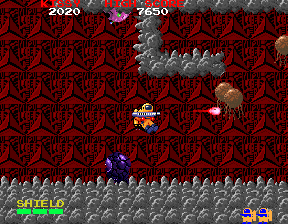
When you start Baraduke, you'll see the title screen followed by the first level. Your character begins at the left edge of the stage, and you immediately need to move right while shooting enemies that appear from both sides. The goal is to survive and reach the end of the area, where a boss awaits.
The core loop is simple: shoot everything that moves, collect weapon upgrades (often dropped by enemies or found in capsules), and avoid taking damage. You can jump over obstacles and some enemy attacks. The game scrolls automatically in most sections, so you must keep moving forward. If you die, you restart from a checkpoint with reduced firepower.
Since this is an arcade title, there are no complicated menus. If you are playing a Japanese ROM dump, the text on screen will be in Japanese, but the interface is minimal and you can usually start by pressing the Start button (Enter on keyboard). The game is designed to be pick-up-and-play, so just focus on reflexes and pattern recognition.
CONTROLS
Controls
- Arrow Keys: Joystick / Movement
- X: Button 1
- S: Button 2
- Z: Button 3
- A: Button 4
- Q: Button 5
- E: Button 6
- Enter: Start / 1P
- V: Coin / Insert
Baraduke FAQ
What type of game is Baraduke?
Baraduke is a run and gun arcade game from 1985. It belongs to the side-scrolling shooter subgenre popular in the mid-80s arcade scene.
Is Baraduke exclusive to Arcade or did it appear on other systems?
Originally an arcade release, Baraduke was later ported to the Sharp X68000 home computer in 1995. It did not receive widespread console ports.
Who developed Baraduke?
Baraduke was developed and published by Namco. The company was known for many iconic arcade games during that era.
You may also like
All Arcade games











GAME INFO
- Platform
- Arcade
- Genre
- Run and Gun
- Publisher
- Namco
- Developer
- Namco
- Released
- 1985
- Players
- 1
- Region
- Japan, USA
COMMENTS (0)
No comments yet. Be the first to share your thoughts.