The game loads when you press Play · press “Play Now” inside the game if it asks.
Alien Sector
Alien Sector
Alien Sector Overview
GAME INFO
How to play Alien Sector online
Getting Started
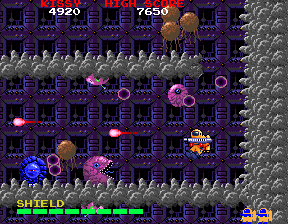
Insert a coin by pressing the start button (Enter) to begin the game. If the screen shows a title or attract mode, press start to join. Once in the game, use the arrow keys to move your ship around the screen. Press the attack button (S) to fire at enemies, and use X if there's a secondary action like a bomb or special weapon. The core loop is simple: survive wave after wave of aliens, collect power-ups that drop from enemies, and score points.
New players should focus on dodging and learning enemy patterns. There is no complex story - the goal is to get the highest score possible. If this is a Japanese release, the menus may be in Japanese, but the gameplay is straightforward enough to play without text. Just keep moving and shooting.
CONTROLS
Controls
- Arrow Keys: Joystick / Movement
- X: Button 1
- S: Button 2
- Z: Button 3
- A: Button 4
- Q: Button 5
- E: Button 6
- Enter: Start / 1P
- V: Coin / Insert
Alien Sector FAQ
What type of game is Alien Sector?
It is a shoot 'em up arcade game from the late 1980s or early 1990s, focusing on fast-paced action against alien foes. The gameplay revolves around destroying enemies, collecting power-ups, and achieving high scores.
Is Alien Sector exclusive to Arcade or did it appear on other systems?
No home console ports are widely documented; it appears to have remained an arcade exclusive. Only dedicated arcade hardware ran this title.
Which regions was Alien Sector released in?
Specific regional release information is not widely available, but it likely saw a limited arcade distribution in certain territories. Most evidence points to a Japan or USA release, though this is unconfirmed.












COMMENTS (0)
No comments yet. Be the first to share your thoughts.