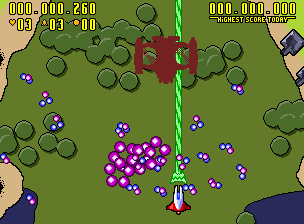
The game loads when you press Play · press “Play Now” inside the game if it asks.
Codename - Blut Engel (2006-01-19) [Homebrew]
Codename - Blut Engel
Getting to Know Codename - Blut Engel
GAME INFO
How to play Codename - Blut Engel online
CONTROLS
Controls
- Arrow Keys: Joystick / Movement
- X: Button 1
- S: Button 2
- Z: Button 3
- A: Button 4
- Q: Button 5
- E: Button 6
- Enter: Start / 1P
- V: Coin / Insert
Codename - Blut Engel FAQ
Who developed Codename - Blut Engel?
The developer(s) behind Codename - Blut Engel are not widely documented. It was produced by an independent homebrew team, but specific names or group details have not been preserved in accessible records.
Is Codename - Blut Engel exclusive to Arcade or did it appear on other systems?
This title was developed specifically for the arcade platform and does not appear to have been ported to other systems. Its availability is limited to emulation and homebrew archives.
What makes Codename - Blut Engel stand out among Arcade titles of its era?
As a homebrew project from 2006, Codename - Blut Engel represents the creative efforts of amateur developers outside the mainstream arcade industry. Its obscurity and DIY nature make it a rare piece for collectors interested in underground arcade development.









COMMENTS (0)
No comments yet. Be the first to share your thoughts.