CHOOSE A VERSION
4 versions · same consoleChoose an original release, regional version, revision, bootleg or clearly labelled ROM hack/mod, then press Play. Hacks may change the gameplay. Switching versions restarts the player.
- Default · set 2, US, FD1094 317-0176
- set 1, Japan, FD1094 317-0175 decrypted · Bootleg
- set 2, US, FD1094 317-0176 decrypted · Bootleg
- set 1, Japan, FD1094 317-0175
Selected: Default · set 2, US, FD1094 317-0176 · USA
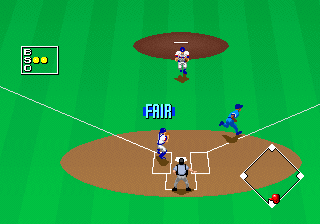
The game loads when you press Play · press “Play Now” inside the game if it asks.
Clutch Hitter (set 2, US, FD1094 317-0176)
Clutch Hitter
Getting to Know Clutch Hitter
GAME INFO
How to play Clutch Hitter online
Getting Started
First insert a credit by pressing whatever coin mechanism your emulated cabinet uses (usually 5 or 6 on the keyboard). Press Start to begin. You will see a team selection screen where you can choose your city and starting pitcher. The core loop is standard baseball: you bat trying to hit pitches and score runs, then you take the field to pitch and field against the computer or a second player.
The camera sits behind home plate giving you a clear view of the strike zone. Use the D-Pad to aim your swing or pitch location. Press the A button to swing or throw. On defense you control fielders automatically but can switch to throw to bases using the buttons. Pay attention to pitch speed and location; the game uses timing-based hitting and a simple but effective pitching system.
Since this is the US version all menus and text are in English. The game supports two-player head-to-head play. If you are playing solo you will face a full season of teams. The AI can be challenging so work the count and look for fastballs to drive.
CONTROLS
Controls
- Arrow Keys: Joystick / Movement
- X: Button 1
- S: Button 2
- Z: Button 3
- A: Button 4
- Q: Button 5
- E: Button 6
- Enter: Start / 1P
- V: Coin / Insert
Clutch Hitter FAQ
Does Clutch Hitter have a multiplayer or co-op mode?
Clutch Hitter supports two-player head-to-head play where each player takes turns batting and pitching. There is no cooperative mode against the computer.
What makes Clutch Hitter stand out among Arcade titles of its era?
The US version includes real Major League Baseball players thanks to a license from the MLB Players Association, which was uncommon for arcade baseball games at the time. The behind-home-plate perspective also gives it a distinct feel from other arcade baseball games that used side views.
Is Clutch Hitter exclusive to Arcade or did it appear on other systems?
Clutch Hitter also appeared on the Sega Game Gear handheld. The arcade version and the Game Gear version share the same core gameplay but the handheld version has reduced graphics and smaller rosters.


COMMENTS (0)
No comments yet. Be the first to share your thoughts.