The game loads when you press Play · press “Play Now” inside the game if it asks.
Chanbara
Chanbara
Inside Chanbara
GAME INFO
How to play Chanbara online
Getting Started
When you start Chanbara, the first thing you will see is the title screen. Press the Start button (Enter) to move to the main menu. If the game is in Japanese, the menu options typically include a straightforward selection: press Up/Down to choose and then press A (X) to confirm. The first option is usually to start a one-player game.
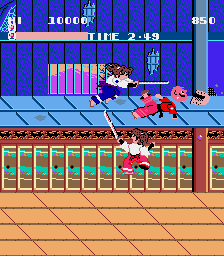
The core loop is simple: move your character using the Arrow Keys and attack enemies with the B button (S). You must clear each screen or stage of enemies before progressing. Watch your health bar and look for occasional power-ups or extra lives. The game will throw increasingly tough waves of foes at you, so staying mobile and timing your strikes is key.
If you run into trouble, try learning enemy patterns and avoid cornering yourself. This is an arcade game, so you will need to adapt quickly and be ready to restart from the beginning if you run out of credits. There are no save points, so every session is a fresh run.
CONTROLS
Controls
- Arrow Keys: Joystick / Movement
- X: Button 1
- S: Button 2
- Z: Button 3
- A: Button 4
- Q: Button 5
- E: Button 6
- Enter: Start / 1P
- V: Coin / Insert
Chanbara FAQ
Does Chanbara have a multiplayer or co-op mode?
The original arcade release of Chanbara is strictly a single-player experience. No co-op or versus modes are present. Two-player simultaneous play is not supported.
In what year was Chanbara originally released?
The exact year of original release is not widely documented. Most sources suggest it debuted in the late 1980s or early 1990s, but a precise date cannot be confirmed without publisher records.
Can players save progress in Chanbara?
No, the arcade version does not include any save function. Like most arcade games of its era, progress is lost when the machine is turned off or the player runs out of credits. Each session starts from the beginning.












COMMENTS (0)
No comments yet. Be the first to share your thoughts.