CHOOSE A VERSION
3 versions · same consoleChoose an original release, regional version, revision, bootleg or clearly labelled ROM hack/mod, then press Play. Hacks may change the gameplay. Switching versions restarts the player.
Selected: Default · World ver 4 · Japan, USA, Europe
The game loads when you press Play · press “Play Now” inside the game if it asks.
Caveman Ninja (World ver 4)
Caveman Ninja
Caveman Ninja - Run and Gun Classic
- Arcade
- Run and Gun
- 5· 0 votes
GAME INFO
- Platform
- Arcade
- Genre
- Run and Gun
- Publisher
- Data East
- Developer
- Data East
- Released
- 1991
- Players
- 1-2
- Region
- Japan, USA, Europe
- Version
- ver 4
How to play Caveman Ninja online
Getting Started
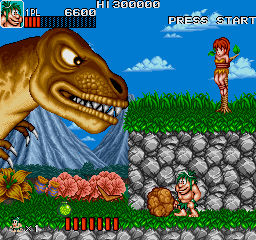
Insert a coin (or press Select then Start) to begin. You control a caveman armed with a stone axe. The core loop is simple: move right, defeat enemies, collect food and weapon upgrades, and reach the end of the stage to face a boss. Each level offers a mix of ground and platform sections, so jumping and timing your attacks are essential.
Your health is shown at the top of the screen. Eating meat dropped by enemies or found in pots restores health. Some enemies throw projectiles or charge, so keep moving and use walls for cover. Power-ups like the boomerang or fire weapon change your attack pattern and can make later stages much easier. If you die, you restart from the last checkpoint unless you continue.
The World version is in English, so menus and instructions are straightforward. Press Start to pause and adjust settings like difficulty or number of lives if you access the test menu (usually via DIP switches on the original hardware). For emulator play, the default key mapping above should work for single player; two-player controls are typically mapped to a separate keyboard layout or gamepad.
CONTROLS
Controls
- Arrow Keys: Joystick / Movement
- X: Button 1
- S: Button 2
- Z: Button 3
- A: Button 4
- Q: Button 5
- E: Button 6
- Enter: Start / 1P
- V: Coin / Insert
Caveman Ninja FAQ
Is Caveman Ninja an official release, a fan hack, a prototype, or another kind of build?
Caveman Ninja (World ver 4) is an official arcade release by Data East. The "ver 4" label indicates it is a later revision of the original game board, likely containing bug fixes or minor balance adjustments. It is not a fan hack, prototype, or homebrew.
Does Caveman Ninja have a multiplayer or co-op mode?
Yes, it supports simultaneous two-player co-op. Two players can join at any time by inserting a second credit and pressing start. Each player controls a different colored caveman, sharing the same screen and helping each other through levels.
Which regions was Caveman Ninja released in?
The game was released in arcades worldwide, including Japan, the United States, and Europe. The World version (ver 4) is a regional revision that includes English text and is intended for international markets.
You may also like
All Arcade games











GAME INFO
- Platform
- Arcade
- Genre
- Run and Gun
- Publisher
- Data East
- Developer
- Data East
- Released
- 1991
- Players
- 1-2
- Region
- Japan, USA, Europe
- Version
- ver 4
COMMENTS (0)
No comments yet. Be the first to share your thoughts.