CHOOSE A VERSION
3 versions · same consoleChoose an original release, regional version, revision, bootleg or clearly labelled ROM hack/mod, then press Play. Hacks may change the gameplay. Switching versions restarts the player.
Selected: Default · U.S. navy 901012 etc · Worldwide
The game loads when you press Play · press “Play Now” inside the game if it asks.
Carrier Air Wing (U.S. navy 901012 etc)
Carrier Air Wing
About Carrier Air Wing
GAME INFO
How to play Carrier Air Wing online
Getting Started
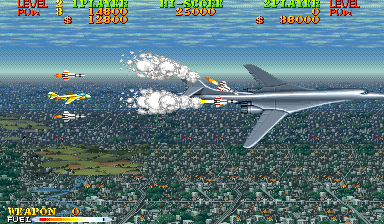
Insert a coin (press Enter with the Select button mapped) and press Start. You choose your aircraft from a small roster - each has different speed, firepower, and special weapons. Once you pick, you're dropped into the first stage, flying left to right over oceans and enemy carriers.
The core loop is classic shoot-'em-up: dodge enemy bullets and ramming fighters while laying down constant fire. You can collect power-ups that beef up your main gun or grant screen-clearing bombs. Pay attention to the radar at the top - it shows incoming enemy waves and boss patterns. There's no continues limit in the arcade version, but each credit gives you a set number of lives.
If you're playing the Japanese version (U.S. Navy), menus and text are in Japanese. The selection screen is straightforward - just press X or S to confirm your plane choice. The game doesn't have complex rank systems; it's pure reflex-based action. Watch for mid-stage branching paths that can change the order of bosses.
CONTROLS
Controls
- Arrow Keys: Joystick / Movement
- X: Button 1
- S: Button 2
- Z: Button 3
- A: Button 4
- Q: Button 5
- E: Button 6
- Enter: Start / 1P
- V: Coin / Insert
Carrier Air Wing FAQ
Is Carrier Air Wing exclusive to Arcade or did it appear on other systems?
Originally it was arcade-only. Capcom planned a home port for the Capcom Power System Changer but it never materialized. Years later it was included in the Capcom Arcade Stadium collection for modern consoles.
Does Carrier Air Wing have a multiplayer or co-op mode?
Yes, two players can play simultaneously, each choosing a different plane. Friendly fire is off, so you can cross streams without hurting each other.
Who developed Carrier Air Wing?
Capcom developed and published the game internally. The development team included many of the same people who worked on U.N. Squadron.












COMMENTS (0)
No comments yet. Be the first to share your thoughts.