The game loads when you press Play · press “Play Now” inside the game if it asks.
Capcom World (Japan)
Capcom World
About Capcom World
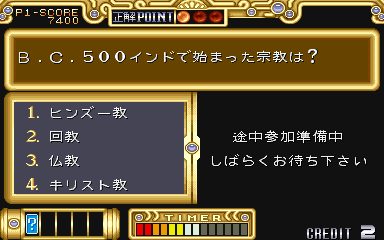
Capcom World is an arcade game released by Capcom in 1989, exclusive to Japan. It's not a traditional action or platformer but more of a compilation or museum piece, celebrating Capcom's arcade lineup up to that point. Think of it as a playable catalog where you can sample snippets of various Capcom hits, all housed under a single cabinet. This is the original Japanese version, so menus and text are entirely in Japanese.
The core experience revolves around selecting and playing short demos or limited versions of classic Capcom games from the late 80s. You navigate a simple menu using the joystick and buttons to choose which game to try. Each playable snippet is a brief, often timed, slice of a well-known title like Ghosts 'n Goblins or 1942. There's no overarching story or persistent progression you just pick a game, play a bit, and then move on to another.
Today, Capcom World is a unique historical artifact rather than a deep gaming experience. For fans of Capcom's early arcade library, it's a fascinating time capsule that shows how the company celebrated its own legacy. It's not a game you'll sink hours into, but it offers a quick nostalgia hit and a peek at how compilations worked before home consoles made them common. If you enjoy retro gaming history, it's worth booting up to see what the company thought worth showcasing back in 1989.
GAME INFO
How to play Capcom World online
Getting Started
When you load Capcom World, you'll be greeted by a title screen in Japanese. Press Start (Enter) to proceed. The main menu presents a list of playable games, likely displayed as icons or text. Use the arrow keys to highlight your choice and press the A button (X on keyboard) to confirm. If you accidentally enter a game, you can usually back out by pressing the B button (S) or waiting for the demo timer to end. The core loop is simple: pick a game from the selection, play a brief snippet, then return to the menu to try another. There are no continues, scores, or extended play sessions each snippet is intentionally short. If you want to see more of a particular game, you'll need to restart the demo. The B button may also serve as a cancel during menu navigation. Since all text is in Japanese, memorizing the layout of the menu can help if you can't read it. Capcom World does not have a traditional ending or high score tracking. It's purely a sampler. Spend a few minutes checking out each game to appreciate the variety of Capcom's early arcade hits. If you get stuck in a game snippet, remember that you can always reset or exit by hitting the Select button (V) or returning to the main menu through available options.CONTROLS
Controls
- Arrow Keys: Joystick / Movement
- X: Button 1
- S: Button 2
- Z: Button 3
- A: Button 4
- Q: Button 5
- E: Button 6
- Enter: Start / 1P
- V: Coin / Insert
Capcom World FAQ
Who developed Capcom World?
Capcom World was developed internally by Capcom. The company had a long history of arcade hits by 1989, and this compilation served as a showcase of their portfolio.
In what year was Capcom World originally released?
Capcom World first appeared in arcades in 1989. It was a Japan-only release and never saw an official port to home consoles or platforms outside the region.
Is Capcom World exclusive to Arcade or did it appear on other systems?
Capcom World is exclusive to arcade cabinets. No home console, handheld, or computer ports were ever released, making the original ROM the only way to experience this museum-like compilation.












COMMENTS (0)
No comments yet. Be the first to share your thoughts.