The game loads when you press Play · press “Play Now” inside the game if it asks.
Cannon Ball (Pacman Hardware) [wrong colors]
Cannon Ball
Cannon Ball on arcade
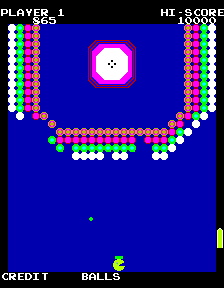
Cannon Ball (Pacman Hardware) [wrong colors] is a peculiar arcade title that runs on the classic Pac-Man hardware. It's not an official Namco release - it appears to be a homebrew or a hack that repurposes the original machine's electronics. The "wrong colors" in the name hint at a deliberate or accidental palette swap, making the already monochrome Pac-Man hardware display unfamiliar hues. The exact year and creator are not widely documented, but it belongs to the underground scene of hobbyists fiddling with 1980s arcade boards.
GAME INFO
How to play Cannon Ball online
Get started by selecting the game and pressing Enter. The core loop revolves around moving your character through maze-like screens, collecting items or avoiding hazards, much like the Pac-Man hardware standard. Without further specifics, treat it as an experimental joystick-driven arcade game - trial and error will reveal its exact rules. If menus appear garbled due to the color glitch, the controls remain the same: arrow keys for movement and X/S for actions.
CONTROLS
Controls
- Arrow Keys: Joystick / Movement
- X: Button 1
- S: Button 2
- Z: Button 3
- A: Button 4
- Q: Button 5
- E: Button 6
- Enter: Start / 1P
- V: Coin / Insert
Cannon Ball FAQ
Is Cannon Ball exclusive to Arcade or did it appear on other systems?
Based on the available information, this version only exists on arcade hardware designed around Pac-Man PCBs. It is not known to have been ported to consoles or home computers.
Does Cannon Ball have a multiplayer or co-op mode?
The original Pac-Man hardware supports only a single player, and this variant is unlikely to add multiplayer. No documentation suggests any cooperative or versus features.
Is Cannon Ball an official release, a fan hack, a prototype, or another kind of build?
It is almost certainly a fan-made hack or homebrew that repurposes Pac-Man arcade hardware. The "wrong colors" label points to a modified ROM or a deliberate glitch rather than an official product.












COMMENTS (0)
No comments yet. Be the first to share your thoughts.