CHOOSE A VERSION
2 versions · same consoleChoose an original release, regional version, revision, bootleg or clearly labelled ROM hack/mod, then press Play. Hacks may change the gameplay. Switching versions restarts the player.
Selected: Default · Original · Japan, USA
The game loads when you press Play · press “Play Now” inside the game if it asks.
Bump 'n' Jump
Bump 'n' Jump
Bump 'n' Jump: arcade Arcade
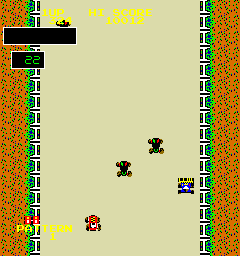
Bump 'n' Jump, also known in Japan as Burnin' Rubber, is a 1982 vehicular combat arcade game from Data East. It landed in North America through Bally Midway and was playable both as a dedicated board and through Data East's DECO Cassette System. This is an official arcade release, not a hack or mod, and it fits right into the early-80s wave of games that used top-down driving to deliver quick, aggressive action.
The goal is straightforward: drive your car to the end of a winding course while bumping enemy vehicles into the sides of the road to destroy them. You also have to jump over large obstacles like bodies of water, timing your leap carefully to avoid crashing. The gameplay is fast and unforgiving, with the camera scrolling forward as you push ahead and enemies spawn from ahead and behind.
Today it's a neat piece of arcade history that feels like a prototype for later vehicular combat games. It's not deep or complex, but the challenge of managing both enemies and obstacles keeps it engaging in short bursts. If you enjoy games like Spy Hunter or other top-down drivers with a violent twist, this is worth a few credits.
GAME INFO
How to play Bump 'n' Jump online
When you start Bump 'n' Jump, just press Enter (Start) to begin. Your car sits at the bottom of the screen and the road scrolls forward automatically. Push up on the Arrow Key to accelerate or maintain speed, and steer left or right to dodge enemy cars and line up bumps.
The core loop is survival and progression: knock out the enemy cars by nudging them into the walls or into oncoming traffic, and press X to jump when you see gaps filled with water or other obstructions. Jumping also lets you land on top of enemies for bonus points. If you crash or get stuck, you lose a life. The game is relentless, so learning the timing of jumps and the patterns of enemy cars is key. There's no pause in the action, so be ready to react quickly.
CONTROLS
Controls
- Arrow Keys: Joystick / Movement
- X: Button 1
- S: Button 2
- Z: Button 3
- A: Button 4
- Q: Button 5
- E: Button 6
- Enter: Start / 1P
- V: Coin / Insert
Bump 'n' Jump FAQ
Who developed Bump 'n' Jump?
Data East developed the game in 1982, with Bally Midway handling the North American distribution.
Is Bump 'n' Jump an official release, a fan hack, a prototype, or another kind of build?
This is an official commercial arcade release from Data East, not a hack or homebrew. It was available both as a dedicated board and on the DECO Cassette System.
Is Bump 'n' Jump considered easy to pick up or challenging?
It is easy to understand but very challenging to master. The constant enemy spawning and obstacle jumps demand quick reflexes and precise timing.












COMMENTS (0)
No comments yet. Be the first to share your thoughts.