CHOOSE A VERSION
3 versions · same consoleChoose an original release, regional version, revision, bootleg or clearly labelled ROM hack/mod, then press Play. Hacks may change the gameplay. Switching versions restarts the player.
Selected: Default · set 1
The game loads when you press Play · press “Play Now” inside the game if it asks.
Buccaneers (set 1)
Buccaneers
About Buccaneers
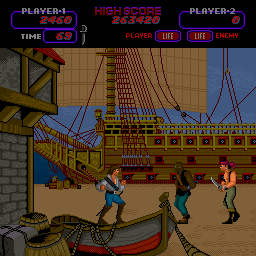
Players control a pirate-themed character or vessel, navigating a fixed-screen or scrolling environment while firing at enemies. The core loop involves dodging incoming threats and eliminating targets to progress. Like many games of its time, it uses a joystick and single button for movement and attack.
Today, Buccaneers serves as a historical curiosity for retro enthusiasts. Its simple mechanics and pixel art style are typical of early arcade design. If you enjoy exploring the roots of arcade gaming, this title offers a straightforward, unpolished glimpse into that period.
GAME INFO
How to play Buccaneers online
Getting Started
Insert a coin by pressing the assigned key (usually 5 or the Select button) to begin. The game's main menu, if present, is minimal - press Start to jump into the action. Buccaneers is a single-screen shooter where you move your character with the arrow keys and fire with the B button (S key).
The goal is to survive waves of enemies while accumulating points. There is no continue system in many early arcade games, so focus on learning enemy patterns. Your ship or character can move in four directions; use walls or obstacles to your advantage.
Buccaneers does not have a pause feature, so be ready to play in short bursts. The game ends when all lives are lost, and high scores are displayed. There are no power-ups or complex mechanics - just pure arcade action.
CONTROLS
Controls
- Arrow Keys: Joystick / Movement
- X: Button 1
- S: Button 2
- Z: Button 3
- A: Button 4
- Q: Button 5
- E: Button 6
- Enter: Start / 1P
- V: Coin / Insert
Buccaneers FAQ
Does Buccaneers have a multiplayer or co-op mode?
No, Buccaneers is a single-player game. There is no cooperative or competitive multiplayer mode included.
Which regions was Buccaneers released in?
The exact regions of release are not widely documented. It likely saw distribution in North America and possibly Japan, but records are unclear.
Is Buccaneers exclusive to Arcade or did it appear on other systems?
Buccaneers appears to be an arcade-only title. No ports to home consoles or computers are known.












COMMENTS (0)
No comments yet. Be the first to share your thoughts.