CHOOSE A VERSION
3 versions · same consoleChoose an original release, regional version, revision, bootleg or clearly labelled ROM hack/mod, then press Play. Hacks may change the gameplay. Switching versions restarts the player.
Selected: Default · set 1
The game loads when you press Play · press “Play Now” inside the game if it asks.
Bomb Jack (set 1)
Bomb Jack
About Bomb Jack
- Arcade
- Platformer
- 5· 0 votes
GAME INFO
- Platform
- Arcade
- Genre
- Platformer
- Publisher
- Tecmo
- Developer
- Tecmo
- Released
- 1984
- Players
- 1
How to play Bomb Jack online
Getting Started
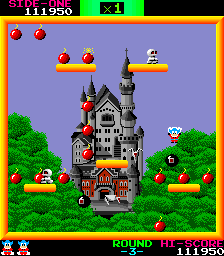
Your goal in Bomb Jack is to collect all the bombs scattered across each stage while avoiding or outmaneuvering enemies. Use the arrow keys to move left or right and press X to jump. Jack has a unique floating ability; if you hold down the jump button after leaping, he will slowly descend, allowing you to hover over gaps or enemies. This is key to navigating the multi-tiered levels.
The core loop is simple: each stage presents a screen filled with platforms, bombs, and a few enemy types. Grab every bomb to clear the stage and move on. Touching an enemy costs a life, but you can land on some enemies to defeat them. Special items and power-ups appear occasionally, such as a P symbol that grants temporary invincibility or extra points. The game ramps up difficulty by introducing faster enemies and trickier platform layouts.
There are no continues, so the challenge is all about memorizing patterns and perfecting your movement. New players should focus on learning Jack's float control and the placement of bombs in each stage. It's a straightforward arcade experience but demands precision and quick reflexes to survive long.
CONTROLS
Controls
- Arrow Keys: Joystick / Movement
- X: Button 1
- S: Button 2
- Z: Button 3
- A: Button 4
- Q: Button 5
- E: Button 6
- Enter: Start / 1P
- V: Coin / Insert
Bomb Jack FAQ
Is Bomb Jack considered easy to pick up or challenging?
Bomb Jack is easy to understand within seconds, but the increasing enemy speed and lack of continues make it quite challenging. Mastering the float mechanic is essential, and later stages require quick reflexes and stage memorization.
Which regions was Bomb Jack released in?
The arcade version of Bomb Jack was originally released in Japan and later in North America and Europe. Tecmo distributed the game widely, so it appeared in arcades around the world during the mid-1980s.
Is Bomb Jack exclusive to Arcade or did it appear on other systems?
Bomb Jack started as an arcade exclusive in 1984, but it was later ported to several home computers such as the Commodore 64, Amiga, and Atari ST. These ports were released primarily in Europe and maintained the core gameplay.
You may also like
All Arcade games











GAME INFO
- Platform
- Arcade
- Genre
- Platformer
- Publisher
- Tecmo
- Developer
- Tecmo
- Released
- 1984
- Players
- 1
COMMENTS (0)
No comments yet. Be the first to share your thoughts.