CHOOSE A VERSION
2 versions · same consoleChoose an original release, regional version, revision, bootleg or clearly labelled ROM hack/mod, then press Play. Hacks may change the gameplay. Switching versions restarts the player.
Selected: Default · Midway · USA
The game loads when you press Play · press “Play Now” inside the game if it asks.
Blue Print (Midway)
Blue Print
Blue Print Overview
GAME INFO
- Platform
- Arcade
- Genre
- Arcade
- Publisher
- Bally Midway
- Developer
- Zilec Electronics
- Released
- 1982
- Region
- USA
How to play Blue Print online
CONTROLS
Controls
- Arrow Keys: Joystick / Movement
- X: Button 1
- S: Button 2
- Z: Button 3
- A: Button 4
- Q: Button 5
- E: Button 6
- Enter: Start / 1P
- V: Coin / Insert
Blue Print FAQ
Which regions was Blue Print released in?
Blue Print originally debuted in North American arcades through Bally Midway. Ports published by CBS Electronics later expanded its availability to other regions.
Is Blue Print considered easy to pick up or challenging?
The basics are easy to grasp - move through mazes and collect items. But like many early 80s arcade titles, difficulty ramps up quickly as enemy patterns become tougher.
What type of game is Blue Print?
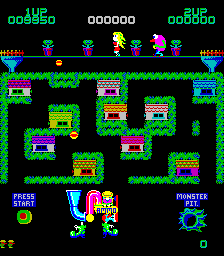
It is an arcade maze game where you navigate screens to collect blueprint pieces while avoiding threats. The structure is similar to classic maze chases but with its own item-collection twist.
You may also like
All Arcade games











GAME INFO
- Platform
- Arcade
- Genre
- Arcade
- Publisher
- Bally Midway
- Developer
- Zilec Electronics
- Released
- 1982
- Region
- USA
COMMENTS (0)
No comments yet. Be the first to share your thoughts.