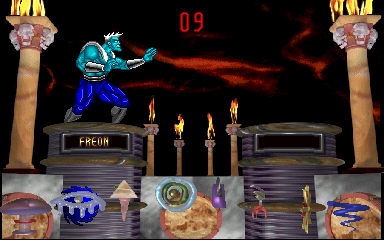
Blood Storm (v2.22)
Blood Storm (v2.22) - Fighting Classic
Blood Storm is an arcade fighting game from the late 1990s, known for its digitized character sprites and brutal finishing moves. This particular version, v2.22, represents a later revision of the original release, likely fixing bugs or adjusting balance. The game runs on Sega's ST-V hardware, a platform famous for hosting several 2D fighters and quirky arcade titles. While the exact year of initial release and the development studio are not widely documented in verified sources, the arcade scene of that era was saturated with digitized fighters following in the footsteps of Mortal Kombat. Blood Storm fits comfortably alongside those, offering a gritty aesthetic and violent combat.
In gameplay, two fighters face off in one-on-one battles with a focus on timed strikes, blocking, and special moves unique to each character. The digitized actors give the action a distinctive, almost cinematic feel, though the controls demand precise inputs for executing combos and finishers. Each match is a best-of-three rounds, and players can choose from a roster of fighters, each with a backstory implied by their appearance and move sets. The v2.22 label suggests tweaks have been made to the original code, possibly improving hit detection or adding extra content, but the core loop remains the same: select a character, beat your opponent, and win by draining their health bar before time expires.
As a product of the ST-V platform, Blood Storm offers a glimpse into a transitional period for arcade fighters, where digitized graphics were a major draw but also becoming dated. Compared to contemporaries like Primal Rage or the later Mortal Kombat 4, Blood Storm has a more niche following. It is worth trying today for fans of obscure fighting games or those curious about the hardware's library. Its v2.22 status hints at developer support post-launch, but it remains a straightforward, if unpolished, arcade experience. Honest about its simplicity, it's a title that rewards patience and practice, but newcomers should expect a steep learning curve typical of many era fighters.
How to Play Blood Storm (v2.22) Online
Getting Started
To begin playing Blood Storm (v2.22), insert a coin by pressing the Select key (V) on the title screen, then press Start (Enter) to enter the main menu. From there, you will likely be asked to choose a fighter from the available roster. The selection screen typically displays character names and portraits, so pick one that appeals to you visually - the digitized sprites give a strong hint about each fighter's style. Once chosen, you will face a CPU opponent in a best-of-three battle.
The core loop of Blood Storm revolves around careful pacing and learning each character's moves. Use the D-Pad to move your fighter toward or away from the opponent, and experiment with the attack buttons (A, B, Y, X) to discover punches, kicks, and special abilities. Blocking is often performed by holding away from the opponent or pressing a dedicated shoulder button - in this case, Q or E may serve as guard or throw commands. Pay attention to the health bar and the round timer; letting the timer run out results in a loss for the player with less health. If you manage to drain the opponent's life completely, you have a brief window to input a fatality sequence (usually a specific button combination) to finish them off in style.
New players should start by practicing basic attacks and blocking against a lower difficulty setting if available. The digitized movement can feel stiff compared to sprite-based fighters, so don't expect fluid combos right away. Memorizing one character's special move inputs (often a quarter-circle or charge motion) will give you an edge. If the in-game menus appear in Japanese, navigate by trial and error - typically, the first option after the title is "Arcade Mode" or "1 Player Game". Patience and repetition are key to mastering this arcade brawler.
Blood Storm (v2.22) Keyboard Controls
Controls
- Arrow Keys: Joystick / Movement
- X: Button 1
- S: Button 2
- Z: Button 3
- A: Button 4
- Q: Button 5
- E: Button 6
- Enter: Start / 1P
- V: Coin / Insert
Comments (0)











