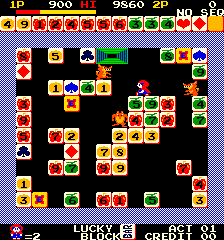
The game loads when you press Play · press “Play Now” inside the game if it asks.
BlockBuster
BlockBuster
What is BlockBuster?
- Arcade
- Board Game
- Homebrew
- 5· 0 votes
GAME INFO
- Platform
- Arcade
- Genre
- Board Game
How to play BlockBuster online
Getting Started
When the game boots, you will likely see a title screen asking for the number of players or teams. Use the D-Pad and confirm with the X key to set up your session. The goal is to collect all eight genre cards before the opposing team does. The game probably presents a series of trivia questions or mini-challenges tied to film genres. Answering correctly or completing a challenge earns your team a genre card. The first team to gather all eight wins.
The interface is simple and menu-driven, so navigate with the arrow keys and confirm selections with X. Since this is a homebrew arcade port, expect straightforward prompts. There is no save function, so plan to play through a full match in one sitting. The cooperative aspect means players on the same team work together, but the controls are shared or turn-based depending on the setup.
CONTROLS
Controls
- Arrow Keys: Joystick / Movement
- X: Button 1
- S: Button 2
- Z: Button 3
- A: Button 4
- Q: Button 5
- E: Button 6
- Enter: Start / 1P
- V: Coin / Insert
BlockBuster FAQ
Can players save progress in BlockBuster?
The arcade version does not include any save functionality. Each session is meant to be completed in one sitting, consistent with the pick-up-and-play nature of most arcade games.
Is BlockBuster exclusive to Arcade or did it appear on other systems?
This specific version is a homebrew arcade adaptation and has not been officially released on other platforms. The original tabletop game by Big Potato Games is available as a physical board game, but this digital port is a fan-made creation for emulation.
Is there anything iconic or memorable about BlockBuster?
The game draws heavily on nostalgia for the Blockbuster video rental chain, which was a cultural touchstone in the 1990s and 2000s. The card-collecting mechanic, centered on film genres, mimics the store's layout and adds a layer of retro appeal for players who remember browsing the shelves.
You may also like
All Arcade games











GAME INFO
- Platform
- Arcade
- Genre
- Board Game
COMMENTS (0)
No comments yet. Be the first to share your thoughts.