The game loads when you press Play · press “Play Now” inside the game if it asks.
Block Carnival / Thunder & Lightning 2
Block Carnival / Thunder & Lightning 2
What is Block Carnival / Thunder & Lightning 2?
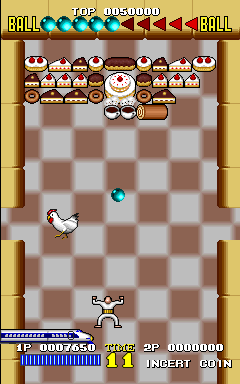
Block Carnival / Thunder & Lightning 2 is an arcade puzzle game that emerged in Japanese arcades during the late 1980s or early 1990s. The exact developer and publisher aren't widely documented, but the title is tied to the earlier Thunder & Lightning, sometimes called Block Carnival. This version may be a sequel or an updated revision of that original game.
Players control a character at the bottom of the screen who catches colored blocks dropping from above. The blocks must be stacked into bins, and matching rows of the same color are cleared to keep the play area from filling up. The game increases speed as you progress, requiring quick reactions and careful planning to avoid stacking blocks too high.
For fans of classic block-dropping puzzles, Block Carnival offers a solid, straightforward challenge that fits alongside other late-80s coin-op titles like Columns or Tetris. Its relative obscurity makes it a neat find for retro collectors, but it doesn't reinvent the genre. The gameplay is simple, addictive, and typical of the era's quarter-munching arcade design.
GAME INFO
How to play Block Carnival / Thunder & Lightning 2 online
Getting Started
When the game boots, you'll see a title screen. Press Enter to start. The core gameplay involves catching falling blocks and stacking them in vertical bins. Use the Arrow Keys to move your catcher left and right. Press X or S to drop blocks faster or rotate them if the game allows.
The objective is to clear rows by matching three or more same-colored blocks in a line. As you clear rows, you earn points and the speed gradually increases. If blocks pile up to the top of a bin, it's game over. The game is straightforward but demands quick decision-making as the pace picks up.
Menus may be in Japanese if this is the original arcade version. The start button typically begins the game, and coin insertion is handled via the emulator's coin key (often 5 or 6). No complex inputs are needed - just move, drop, and match.
CONTROLS
Controls
- Arrow Keys: Joystick / Movement
- X: Button 1
- S: Button 2
- Z: Button 3
- A: Button 4
- Q: Button 5
- E: Button 6
- Enter: Start / 1P
- V: Coin / Insert
Block Carnival / Thunder & Lightning 2 FAQ
Can players save progress in Block Carnival / Thunder & Lightning 2?
Arcade games from this period generally lack save functions. High scores are recorded at the end of a play session, but there is no way to continue from a saved state.
Is Block Carnival / Thunder & Lightning 2 exclusive to Arcade or did it appear on other systems?
Thunder & Lightning appeared on a few home platforms, but this specific Block Carnival / Thunder & Lightning 2 version is an arcade-only release. No home console or computer port is widely known.
Does Block Carnival / Thunder & Lightning 2 have a multiplayer or co-op mode?
The game is strictly a single-player experience. No documented multiplayer or cooperative mode exists in this arcade title.












COMMENTS (0)
No comments yet. Be the first to share your thoughts.