The game loads when you press Play · press “Play Now” inside the game if it asks.
Blazing Star
Blazing Star
Blazing Star - Shooter Classic
GAME INFO
How to play Blazing Star online
Getting Started
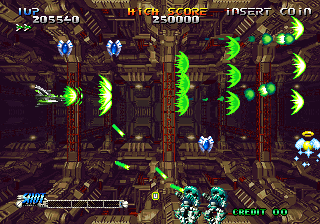
After pressing Start, you pick from several ships on the title screen. Each ship handles differently in speed and shot pattern. Once you select, the stage begins scrolling right. Your goal is to shoot down all enemies and dodge their bullets while collecting power-up icons that fall from destroyed foes.
The core loop is simple: destroy everything, grab the lettered power-ups (S for speed, L for laser, etc.), and use your bomb button (default B) when surrounded. You have a limited stock of bombs, so use them wisely. The game is less punishing than Pulstar, but don't take it too lightly - patterns get dense in later levels.
If you've played other horizontal shooters like R-Type or Pulstar, you'll feel at home. The ship selection screen is in English, so no language barrier. Just pick, shoot, and survive.
CONTROLS
Controls
- Arrow Keys: Joystick / Movement
- X: Button 1
- S: Button 2
- Z: Button 3
- A: Button 4
- Q: Button 5
- E: Button 6
- Enter: Start / 1P
- V: Coin / Insert
Blazing Star FAQ
Who developed Blazing Star?
Yumekobo developed the game, with SNK handling publishing duties.
What type of game is Blazing Star?
It is a horizontally scrolling shooter, often called a side-scrolling shoot 'em up, where players pilot a starship through enemy-filled stages.
Is Blazing Star exclusive to Arcade or did it appear on other systems?
It originally released for the Neo Geo MVS arcade system and later for the Neo Geo AES home console. It has also been included in various Neo Geo compilations on modern platforms.












COMMENTS (0)
No comments yet. Be the first to share your thoughts.