The game loads when you press Play · press “Play Now” inside the game if it asks.
Blade Master (World)
Blade Master
What is Blade Master?
GAME INFO
How to play Blade Master online
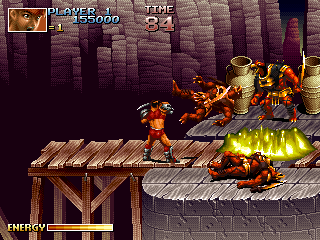
To start playing, insert a coin by pressing the Select (V) button, then press Start (Enter) to begin a new game. You control a warrior who must fight through several stages. Move with the arrow keys, attack with the B button (S), jump with the A button (X), and use your special attack or item with the Y or X buttons if available.
The core loop is simple: clear each screen of enemies, avoid taking too much damage, and survive until the stage boss. You can pick up health or power-ups dropped by enemies or found in breakable objects. Learning the timing of your attacks and when to retreat is key, as enemies often rush you from both sides.
There is no save feature, so like most arcade games of this era, you must finish the game in one sitting or use continues. If you run out of lives, you can continue by pressing Start again if credits remain. The game may end abruptly if the ROM has emulation quirks, but that is part of the imperfect version's character.
CONTROLS
Controls
- Arrow Keys: Joystick / Movement
- X: Button 1
- S: Button 2
- Z: Button 3
- A: Button 4
- Q: Button 5
- E: Button 6
- Enter: Start / 1P
- V: Coin / Insert
Blade Master FAQ
What type of game is Blade Master?
It is a side-scrolling action game designed for arcade machines. The player fights enemies using a melee weapon and must progress through linear stages.
Can players save progress in Blade Master?
No save feature exists in this game. Arcade titles from its era relied on high scores and continues rather than persistent progress.
Is there anything iconic or memorable about Blade Master?
Widely recognized details are sparse. The imperfect sound and graphics in the preserved version give it a distinct bootleg or prototype feel that some collectors find interesting.












COMMENTS (0)
No comments yet. Be the first to share your thoughts.