The game loads when you press Play · press “Play Now” inside the game if it asks.
Black Panther
Black Panther
About Black Panther
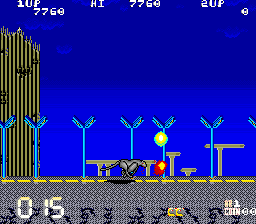
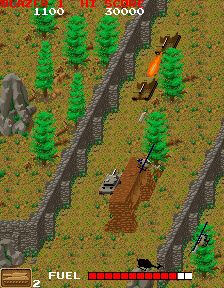
Black Panther is an arcade title that surfaced during the golden age of coin-operated machines, likely in the late 1980s. Its exact release year and development studio remain undocumented, but the game fits the mold of straightforward action games that populated arcade cabinets of that era. The title alone might suggest a martial arts or animal-themed beat-em-up, but without a confirmed trusted summary, we lean on the broader conventions of 1980s arcade design.
What you actually do in Black Panther is control a character as they move through side-scrolling or vertically oriented stages, dispatching enemies with attacks or projectiles. The mechanics follow typical arcade tropes: collect power-ups, avoid hazards, and survive until the boss. Specific abilities or enemy patterns are not widely recorded, but the core loop of move, fight, and progress remains consistent with the genre's expectations.
For modern retro enthusiasts, Black Panther is a curiosity from a time when arcades churned out countless titles. It may not have the fame of a Pac-Man or Street Fighter, but it represents the obscure side of gaming history worth exploring if you enjoy digging up forgotten cabinets. Be honest - it is a niche title, but that is part of its appeal for collectors and fans of the unexpected.
GAME INFO
How to play Black Panther online
Getting Started: Insert a coin or press Enter to start. You will control your character through a series of stages. Use the arrow keys to move, X to jump, and S to attack. The objective is to defeat all enemies and reach the end of each level. If there are menus, they are likely simple - press Start to continue. Observe enemy patterns and avoid taking damage. Power-ups may appear; collect them to enhance your abilities. The loop is straightforward: clear enemies, progress, and survive. If the game is in Japanese, the menu options will be in kanji, but the gameplay remains intuitive - just focus on moving and attacking.
CONTROLS
Controls
- Arrow Keys: Joystick / Movement
- X: Button 1
- S: Button 2
- Z: Button 3
- A: Button 4
- Q: Button 5
- E: Button 6
- Enter: Start / 1P
- V: Coin / Insert
Black Panther FAQ
Is Black Panther exclusive to Arcade or did it appear on other systems?
Black Panther appears to be exclusive to arcade machines. No known ports to home consoles or computers have been documented.
Does Black Panther have a multiplayer or co-op mode?
There is no evidence of multiplayer or co-op support in Black Panther. It appears to be a single-player title.
Who developed Black Panther?
The original developer of Black Panther is not widely documented. It may have been produced by a lesser-known studio or as a generic arcade board.


COMMENTS (0)
No comments yet. Be the first to share your thoughts.