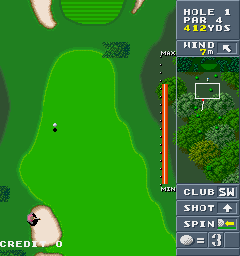
The game loads when you press Play · press “Play Now” inside the game if it asks.
Birdie Try (Japan)
Birdie Try
Inside Birdie Try
Birdie Try is an arcade game that originally launched in Japan during the early 1990s. Based on its title, it appears to be a golf-themed sports title, though complete documentation on its development team remains scarce. The game ran on arcade hardware common at the time, likely using a standard joystick and button layout.
The player takes on the role of a golfer, navigating a series of holes on a course. Typical arcade golf mechanics of the period involved aiming with a directional input, then executing a swing using a timing-based meter or button press. Success came from managing distance, wind, and terrain - all elements that probably factor into Birdie Try's challenge. The core loop is simple: play each hole, try for par or better, and finish the course with a low score.
Birdie Try is a relatively obscure title even among arcade enthusiasts, largely due to its Japan-only release. For collectors and emulation fans, it represents a snapshot of early 1990s arcade sports design that never reached a global audience. While it may not have the polish of major franchises, its rarity gives it a unique appeal for anyone curious about lost arcade library.
GAME INFO
How to play Birdie Try online
Getting Started
Insert a coin and press Start to begin. You'll likely see a title screen with Japanese options; pressing Start usually advances to a character or course selection. The main menu navigation uses the D-pad and the A button to confirm. Once in the game, your objective is to complete each hole in as few strokes as possible. Use the D-pad to aim your shot, then press the A button (X key) to start your swing. Time your second press for accuracy - many golf games require a two-step swing mechanic. The B button may cancel or adjust your stance. After the shot, you'll move to the ball's new position and repeat until you sink the putt.CONTROLS
Controls
- Arrow Keys: Joystick / Movement
- X: Button 1
- S: Button 2
- Z: Button 3
- A: Button 4
- Q: Button 5
- E: Button 6
- Enter: Start / 1P
- V: Coin / Insert
Birdie Try FAQ
Who developed Birdie Try?
The development studio behind Birdie Try is not widely documented in accessible sources. It is presumed to be a Japanese arcade developer from the early 1990s, but no specific company has been confirmed.
What type of game is Birdie Try?
Birdie Try is a sports game, more specifically a golf simulation. The gameplay revolves around completing golf holes with a limited number of strokes, using timing-based controls.
Is Birdie Try exclusive to Arcade or did it appear on other systems?
Birdie Try was released exclusively as an arcade machine in Japan. There is no record of official ports to home consoles or personal computers.


COMMENTS (0)
No comments yet. Be the first to share your thoughts.