CHOOSE A VERSION
3 versions · same consoleChoose an original release, regional version, revision, bootleg or clearly labelled ROM hack/mod, then press Play. Hacks may change the gameplay. Switching versions restarts the player.
Selected: Default · set 1
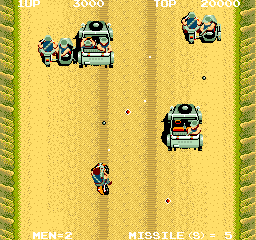
The game loads when you press Play · press “Play Now” inside the game if it asks.
Battle Lane! Vol. 5 (set 1)
Battle Lane! Vol. 5
Battle Lane! Vol. 5 Overview
GAME INFO
How to play Battle Lane! Vol. 5 online
Getting Started
Insert a coin (press Enter if playing on an emulator) to begin. The game starts immediately with your character positioned on the left side of the screen. Use the arrow keys to move and X to fire or interact, depending on the mapping.
The core loop involves clearing each wave of enemies while avoiding their attacks. Points are awarded for each enemy destroyed. The difficulty increases as you progress, with faster and more numerous foes. There are no continues, so surviving as long as possible is key to achieving a high score.
If you are unfamiliar with early 80s arcade conventions, be aggressive but watch your surroundings. There is no pause - the action is constant. Experiment with moving and shooting patterns to find the best strategy for each threat.
CONTROLS
Controls
- Arrow Keys: Joystick / Movement
- X: Button 1
- S: Button 2
- Z: Button 3
- A: Button 4
- Q: Button 5
- E: Button 6
- Enter: Start / 1P
- V: Coin / Insert
Battle Lane! Vol. 5 FAQ
Which regions was Battle Lane! Vol. 5 released in?
The specific regional release details for Battle Lane! Vol. 5 are not widely recorded. It likely saw a limited arcade distribution, possibly in North America and Japan, but concrete evidence is scarce.
Is Battle Lane! Vol. 5 exclusive to Arcade or did it appear on other systems?
No ports to home consoles or computers are known. This title appears to have been exclusive to arcade cabinets.
Who developed Battle Lane! Vol. 5?
The developer of this game is not clearly documented in common sources. It may have been produced by a smaller arcade manufacturer of the early 80s.












COMMENTS (0)
No comments yet. Be the first to share your thoughts.