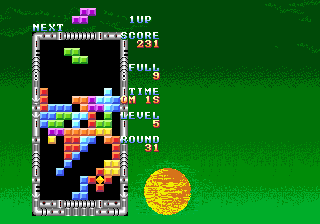
The game loads when you press Play · press “Play Now” inside the game if it asks.
Atomic Point (Korea)
Atomic Point
Atomic Point - Arcade Classic
The gameplay is presumed to follow the arcade conventions of its time: the player controls a character or cursor on screen, aiming to collect items or reach a target while avoiding hazards. The core loop would involve quick reflexes and pattern recognition, typical of many coin-operated cabinets from that era. Without verified mechanics, we can only speculate that Atomic Point involves scoring points or clearing stages in a simple, action-oriented manner.
For modern retro gamers, Atomic Point (Korea) is worth a glance if you are curious about obscure Korean arcade titles. It lacks the polish or recognition of major releases, but that obscurity itself can be appealing - a piece of arcade history that few have encountered. If you enjoy unearthing hidden gems and don't mind a simple, no-frills experience, this might be a fun anomaly to try in an emulator.
GAME INFO
How to play Atomic Point online
Getting Started
Since Atomic Point (Korea) is an obscure arcade game with no detailed documentation, the starting procedure follows generic arcade expectations. First, press Enter to start the game - this typically inserts a virtual coin and then begins a session. If a title screen or menu appears, use arrow keys to navigate and confirm with X (A button).
The core objective is likely to control an on-screen element, collect points or objects, and avoid obstacles until you run out of lives or time. The gameplay loop is driven by repetition and score chasing, as was common for many arcade cabinets of the early 90s. Watch the screen for patterns, react quickly to hazards, and try to survive as long as possible.
Because the game is in Korean and may contain untranslated text, menus or instructions might be hard to navigate if you don't know the language. However, most arcade games from this era rely on simple visual feedback and button presses, so trial and error should be enough to understand the basics.
CONTROLS
Controls
- Arrow Keys: Joystick / Movement
- X: Button 1
- S: Button 2
- Z: Button 3
- A: Button 4
- Q: Button 5
- E: Button 6
- Enter: Start / 1P
- V: Coin / Insert
Atomic Point FAQ
Who developed Atomic Point?
The developer of Atomic Point (Korea) is not widely documented. No credible sources attribute it to a known studio, so its origins remain unclear.
Does Atomic Point have a multiplayer or co-op mode?
There is no evidence of multiplayer or co-op modes. The game is most likely a single-player arcade experience, as was typical for many obscure titles of its era.
Is there anything iconic or memorable about Atomic Point?
Atomic Point (Korea) has not achieved iconic status or widespread recognition. Its obscurity is its main characteristic, making it a curiosity for collectors of rare arcade ROMs.












COMMENTS (0)
No comments yet. Be the first to share your thoughts.