The game loads when you press Play · press “Play Now” inside the game if it asks.
Asura Blade - Sword of Dynasty (Japan) [Imperfect GFX]
Asura Blade - Sword of Dynasty
Asura Blade - Sword of Dynasty - Fighting Classic
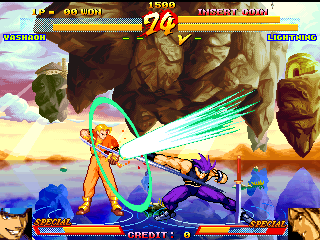
Asura Blade - Sword of Dynasty is an obscure 2D fighting game that originally hit arcades in Japan during the mid-1990s. The specific version hosted here carries the "[Imperfect GFX]" tag, which means the ROM has some graphical glitches or missing elements - likely due to a partial dump or emulation issues. The exact developer and publisher are not widely documented, but it belongs to a wave of post-Street Fighter II arcade fighters that tried to carve out their own identity with fantasy themes and weapon-based combat.
GAME INFO
How to play Asura Blade - Sword of Dynasty online
Getting started is straightforward. When the game boots, you'll likely see a character selection screen. Press the Arrow Keys to move through the roster and confirm with X (A button). The core gameplay involves one-on-one battles where you land punches, kicks, and special moves to deplete the opponent's health bar. Since this is the Japanese version, menus and HUD text are in Japanese, but the layout is typical for a 1990s arcade fighter - start, choose character, then fight. The basic controls map attack buttons to S, Z, A, and Q/E for shoulder buttons if your character has unique techniques. If you encounter garbled graphics due to the imperfect ROM, the game remains playable in most cases. Expect a standard best-of-three rounds format.
CONTROLS
Controls
- Arrow Keys: Joystick / Movement
- X: Button 1
- S: Button 2
- Z: Button 3
- A: Button 4
- Q: Button 5
- E: Button 6
- Enter: Start / 1P
- V: Coin / Insert
Asura Blade - Sword of Dynasty FAQ
Is there anything iconic or memorable about Asura Blade - Sword of Dynasty?
It is a relatively obscure arcade fighter that stands out for its fantasy Asian setting and weapon-using characters. While not revolutionary, its rarity and distinctive visual style make it a curiosity for retro enthusiasts.
Roughly how long does it take to finish Asura Blade - Sword of Dynasty?
A single playthrough lasts about 5 to 10 minutes, depending on difficulty. The game has no long story mode, so you can beat the arcade ladder in a few short rounds.
Who developed Asura Blade - Sword of Dynasty?
The developer is not widely documented in mainstream sources. It was likely produced by a small or short-lived arcade studio that released only a handful of fighting games in the mid-90s.












COMMENTS (0)
No comments yet. Be the first to share your thoughts.