The game loads when you press Play · press “Play Now” inside the game if it asks.
Appoooh
Appoooh
Appoooh on arcade
Appoooh is an arcade fighting game released by Sega in 1984. It arrived during the golden age of arcade one-on-one fighters, offering players a direct combat experience with simple controls and fast-paced matches. The game was originally distributed in arcade cabinets, typical of the era's coin-op scene.
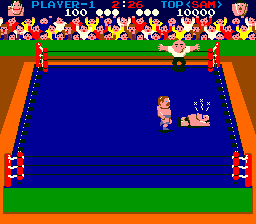
In Appoooh, two characters face off in a rectangular arena. Players control a fighter using a joystick and buttons to execute punches, kicks, and special moves. The objective is to deplete the opponent's health bar before losing your own. Matches are short and demand quick reflexes and pattern recognition. There is no complex story - just pure arcade fighting.
Today, Appoooh is a niche title appreciated by retro fighting game collectors. It stands alongside other early fighters like Karate Champ and Yie Ar Kung-Fu, but its simpler visuals and mechanics make it a more straightforward pick. If you enjoy early arcade combat games, it's worth a few rounds to see how Sega approached the genre before Street Fighter defined it.
GAME INFO
How to play Appoooh online
Getting started: When you first start Appoooh, you can choose between a single-player match against the computer or a two-player versus mode. The game boots directly into a character select or title screen; press Start (Enter) to begin. Your goal is to knock out your opponent by landing enough hits. Use the D-Pad to move and the attack buttons to punch, kick, or perform special moves (which differ by character, though the default fighter has a basic set). The core loop is repetitive: read your opponent's patterns, close in, land hits, and avoid taking damage. Because the AI can be aggressive, focus on blocking and countering. There are no continues or saves - every credit counts. If you are playing a Japanese version, the menus are in Japanese, but the game is so simple that trial and error works fine. Just pick a mode, start fighting, and learn the timing.
CONTROLS
Controls
- Arrow Keys: Joystick / Movement
- X: Button 1
- S: Button 2
- Z: Button 3
- A: Button 4
- Q: Button 5
- E: Button 6
- Enter: Start / 1P
- V: Coin / Insert
Appoooh FAQ
Can players save progress in Appoooh?
Appoooh is an arcade game from 1984 with no save functionality. Each play session is self-contained; progress resets when the machine is powered off or the game ends.
Is Appoooh considered easy to pick up or challenging?
The controls are simple, but the AI presents a moderate challenge. New players can grasp basic moves quickly, but mastering timing and counters takes practice to consistently beat the computer.
Which regions was Appoooh released in?
Appoooh first launched in Japan in 1984. It later saw limited release in other regions, though exact distribution details are not widely documented.












COMMENTS (0)
No comments yet. Be the first to share your thoughts.