CHOOSE A VERSION
2 versions · same consoleChoose an original release, regional version, revision, bootleg or clearly labelled ROM hack/mod, then press Play. Hacks may change the gameplay. Switching versions restarts the player.
Selected: Default · prototype, later build
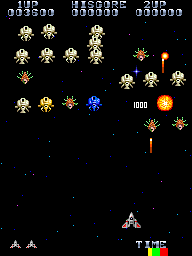
The game loads when you press Play · press “Play Now” inside the game if it asks.
Android (prototype, later build)
Android
Android - Shooter Classic
GAME INFO
How to play Android online
CONTROLS
Controls
- Arrow Keys: Joystick / Movement
- X: Button 1
- S: Button 2
- Z: Button 3
- A: Button 4
- Q: Button 5
- E: Button 6
- Enter: Start / 1P
- V: Coin / Insert
Android FAQ
Which regions was Android released in?
The exact regions of release are not widely documented. Given it is a prototype, it may have only appeared in testing locations or was never officially distributed. Likely Japan or the United States, but no confirmation exists.
What type of game is Android?
Based on the arcade era and limited evidence, Android appears to be an action game, possibly a fixed-screen shooter. Without a trusted catalog description, the precise genre remains uncertain, but it fits the shooter or action arcade style of the early 1980s.
Is Android exclusive to Arcade or did it appear on other systems?
Android was developed for arcade cabinets and there are no known ports to home consoles or computers. This prototype build is specifically an arcade version, and no evidence suggests it was released on other platforms.












COMMENTS (0)
No comments yet. Be the first to share your thoughts.