CHOOSE A VERSION
7 versions · same consoleChoose an original release, regional version, revision, bootleg or clearly labelled ROM hack/mod, then press Play. Hacks may change the gameplay. Switching versions restarts the player.
- Default · set 4, System 16B, unprotected
- set 1, Japan, old, System 16A, FD1089A 317-0033
- set 2, System 16A, FD1089A 317-0033
- set 3, System 16B, FD1089A 317-0033
- set 5, System 16A, FD1089B 317-0037
- set 6, Japan, new, System 16B, FD1089A 317-0033
- set 7, System 16B, MC-8123B 317-00xx
Selected: Default · set 4, System 16B, unprotected
The game loads when you press Play · press “Play Now” inside the game if it asks.
Alien Syndrome (set 4, System 16B, unprotected)
Alien Syndrome
What is Alien Syndrome?
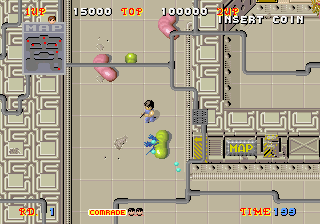
As the player, you guide a character through a series of sci-fi environments, blasting alien creatures and collecting loot. The core gameplay involves real-time combat mixed with RPG mechanics: you gain experience, improve your character's stats, and unlock new abilities as you progress. The game encourages exploration and backtracking to find better gear and secrets, while straightforward quest objectives push the story forward.
For fans of the Alien Syndrome series, this entry offers a fresh take by blending traditional run-and-gun action with deeper character customization. It's a decent action RPG for its time, but the shift away from pure arcade shooting might not appeal to everyone. If you enjoy games like Phantasy Star Online or the later 2D action RPGs of the mid-2000s, this is worth a look - just keep in mind that the controls and presentation are adapted from portable systems.
GAME INFO
- Platform
- Arcade
- Genre
- RPG
- Publisher
- Sega
- Developer
- Totally Games
- Released
- 2007
- Version
- set 4 (System 16B, unprotected)
How to play Alien Syndrome online
This is an action RPG, so your first goal is to get familiar with the controls. Use the Arrow Keys to move your character around the map. Press X to attack enemies with your current weapon or interact with objects and NPCs. The B button (S) can be used to run or cancel selections. Open the inventory by pressing A (X button) to equip new gear or use items. Start (Enter) pauses the game and brings up the menu where you can view your progress, skills, and quest log. Select (V) may toggle a map or additional info.
As you explore, you'll encounter alien creatures that drop loot and experience. Defeat them, grab their drops, and keep an eye on your health bar. You can level up your character by earning enough XP, which unlocks new abilities and improves your stats. The game encourages revisiting earlier areas with better gear to find hidden paths or items. If you get stuck, look for quest markers or talk to every NPC - many give hints or side objectives. Menus are in English, so navigation should be straightforward.
CONTROLS
Controls
- Arrow Keys: Joystick / Movement
- X: Button 1
- S: Button 2
- Z: Button 3
- A: Button 4
- Q: Button 5
- E: Button 6
- Enter: Start / 1P
- V: Coin / Insert
Alien Syndrome FAQ
Who developed Alien Syndrome?
Totally Games developed this 2007 iteration of Alien Syndrome for the PlayStation Portable and Wii. The franchise itself was originally created by Sega.
Is there anything iconic or memorable about Alien Syndrome?
This version is notable for shifting the series from its arcade roots into an action RPG with leveling and loot systems. It also expands the lore by setting the story a century after the original games.
Is Alien Syndrome exclusive to Arcade or did it appear on other systems?
It originally launched on PlayStation Portable and Wii. The arcade version seen here is a reproduction or emulated dump of that same game, not the 1988 arcade original.
You may also like
All Arcade games











GAME INFO
- Platform
- Arcade
- Genre
- RPG
- Publisher
- Sega
- Developer
- Totally Games
- Released
- 2007
- Version
- set 4 (System 16B, unprotected)
COMMENTS (0)
No comments yet. Be the first to share your thoughts.