CHOOSE A VERSION
2 versions · same consoleChoose an original release, regional version, revision, bootleg or clearly labelled ROM hack/mod, then press Play. Hacks may change the gameplay. Switching versions restarts the player.
Selected: Default · Original · Europe
The game loads when you press Play · press “Play Now” inside the game if it asks.
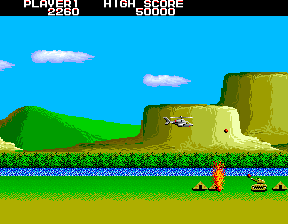
Airwolf
Airwolf
Inside Airwolf
GAME INFO
- Platform
- Arcade
- Genre
- Shooter
- Publisher
- Elite Systems
- Developer
- Elite Systems
- Released
- 1984
- Players
- 1
- Region
- Europe
How to play Airwolf online
CONTROLS
Controls
- Arrow Keys: Joystick / Movement
- X: Button 1
- S: Button 2
- Z: Button 3
- A: Button 4
- Q: Button 5
- E: Button 6
- Enter: Start / 1P
- V: Coin / Insert
Airwolf FAQ
Who developed Airwolf?
Elite Systems developed the original Airwolf game for home computers in 1984. The arcade version you play here is an emulated port of that title.
Which regions was Airwolf released in?
Airwolf was primarily released in Europe, where Elite Systems was based. There may have been limited releases elsewhere, but the game is most commonly associated with the UK market.
Is Airwolf an official release, a fan hack, a prototype, or another kind of build?
This is an official commercial release originally sold for home computers. The arcade listing is an emulated version of that official game, not a hack or prototype.
You may also like
All Arcade games











GAME INFO
- Platform
- Arcade
- Genre
- Shooter
- Publisher
- Elite Systems
- Developer
- Elite Systems
- Released
- 1984
- Players
- 1
- Region
- Europe
COMMENTS (0)
No comments yet. Be the first to share your thoughts.