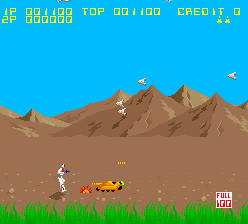
The game loads when you press Play · press “Play Now” inside the game if it asks.
Aeroboto
Aeroboto
About Aeroboto
Aeroboto is an arcade game that appears on retrogames.cc, though its original release details are not widely documented. The title suggests a robot or mecha theme, likely from the golden age of arcades, but without confirmed sources, its developer, publisher, and exact year remain unknown. It is presented here as a playable ROM, possibly an obscure or prototype build from the 1980s or 1990s.
Based on the platform and era, the gameplay likely follows typical arcade conventions: the player controls a character or vehicle through a series of levels, avoiding obstacles and defeating enemies to achieve a high score. If the name is any indication, the player may pilot a flying robot, shooting or dodging threats in a side-scrolling or top-down perspective. However, without confirmed details, the specific mechanics cannot be stated with certainty.
Today, Aeroboto is a curiosity for retro collectors and arcade enthusiasts. Its relative obscurity makes it a niche find rather than a classic, but that very obscurity can be appealing to players who enjoy digging up forgotten titles. If you like exploring the less-traveled corners of arcade history, this may be worth a few credits.
GAME INFO
How to play Aeroboto online
Since specific gameplay details for Aeroboto are not well documented, this guide covers standard arcade operation. After loading the ROM, press Enter to start. If the game has a title screen, use the D-Pad to navigate any menus and press X to confirm. The core loop typically involves moving left or right, avoiding hazards, and attacking enemies with the B button (S). Watch for power-ups that may appear and try to survive as long as possible to maximize your score.
If this is a Japanese-only title, menus may be in Japanese, but arcade games of that era often used minimal text. Experiment with the controls to get a feel for movement and attack. The goal is usually to clear stages or achieve a high score before losing all lives. There is often no save system, so each playthrough is fresh. Check the retrogames.cc page for any specific notes or community tips if you get stuck.
CONTROLS
Controls
- Arrow Keys: Joystick / Movement
- X: Button 1
- S: Button 2
- Z: Button 3
- A: Button 4
- Q: Button 5
- E: Button 6
- Enter: Start / 1P
- V: Coin / Insert
Aeroboto FAQ
What type of game is Aeroboto?
Aeroboto is an arcade game, likely from the 1980s or early 1990s, with a robot or mecha theme. Without confirmed documentation, it is generally categorized as an action or shooter game based on the era and platform.
Is Aeroboto exclusive to Arcade or did it appear on other systems?
There are no known ports or home versions of Aeroboto. It appears to have been an arcade-only release, though its exact distribution is unclear due to the lack of historical records.
What makes Aeroboto stand out among Arcade titles of its era?
Aeroboto is notable primarily for its obscurity and the robot theme implied by its name. Unlike major arcade hits of the time, it remains undiscovered by most players, offering a sense of exploration for retro enthusiasts.












COMMENTS (0)
No comments yet. Be the first to share your thoughts.