The game loads when you press Play · press “Play Now” inside the game if it asks.
600
600
What is 600?
600 is an arcade game that appears on the retrogames.cc library, though very little public documentation exists about its origins or development. The title alone suggests a numerical theme, common in racing or sports titles from the 1980s, but without verified catalog notes, no specific publisher, developer, or release year can be confirmed. It is listed on the site as a standard arcade ROM, implying it was once distributed on arcade hardware, likely during the golden age of arcades.
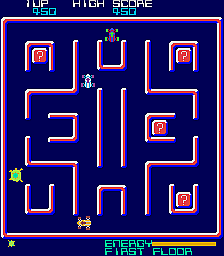
Since no verified gameplay details are available, what a player does in 600 remains unclear. It could be a driving game, a shoot-'em-up, or an abstract puzzle game - common genres for arcade titles with numeric names. The core loop likely follows the typical arcade model: start with a set number of lives or time, progress through levels or increasing speed, and try to achieve a high score. Without specific information, one can only assume the game relied on simple controls and immediate feedback to attract quarters.
For a retro gaming collector, 600 represents a bit of a mystery - an obscure title with little online footprint. It may be worth trying simply to see what it is, or to complete one's collection of rare arcade ROMs. If you enjoy digging into unknown games and judging them on their own merits, this could be an interesting curiosity. However, if you prefer well-documented classics, 600 might not offer enough context to engage with meaningfully.
GAME INFO
How to play 600 online
Getting Started
When you boot 600 in the emulator, you will likely see a title screen or a brief attract mode. Press Enter to start the game. Since the specific genre is unknown, you may need to experiment with the controls - try pressing X or S to see if they trigger an action. Many arcade games from the era used a single button for primary action, so start there. The core objective is probably to achieve the highest score possible. Watch for on-screen indicators like score, lives, or time remaining. If the game uses a numeric name like 600, it might relate to a score target, speed limit, or countdown. Without knowing the exact mechanics, the best approach is to move your character (or vehicle) with the arrow keys and press buttons to interact with the game world. If you die or fail, you will likely see a continue prompt. Classic arcade games often allowed you to continue by inserting another credit - emulated here by pressing Enter again. If the game is in Japanese (unlikely given the numeric title), menus would be minimal. Just start playing and learn by doing. If you get stuck, consult online forums or search for gameplay videos to uncover the hidden rules.CONTROLS
Controls
- Arrow Keys: Joystick / Movement
- X: Button 1
- S: Button 2
- Z: Button 3
- A: Button 4
- Q: Button 5
- E: Button 6
- Enter: Start / 1P
- V: Coin / Insert
600 FAQ
Who developed 600?
The developer of 600 is not documented in widely available sources. Without a trusted catalog summary or known publisher, the original creator remains unknown.
Can players save progress in 600?
600 does not support saving progress. It is designed as an arcade coin-op, meaning each session starts from scratch with no persistent memory or battery backup.
Is 600 considered easy to pick up or challenging?
Since no verified gameplay information exists, the difficulty level cannot be assessed. However, many arcade games from the era were designed to be easy to start but increasingly difficult to master in order to encourage repeated play.












COMMENTS (0)
No comments yet. Be the first to share your thoughts.