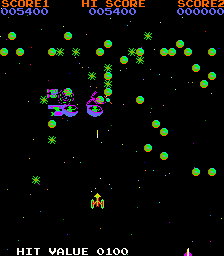
The game loads when you press Play · press “Play Now” inside the game if it asks.
4 Fun in 1 [Bootleg]
4 Fun in 1
4 Fun in 1 - Arcade Classic
GAME INFO
How to play 4 Fun in 1 online
When you start 4 Fun in 1, you'll likely see a title screen or a simple menu listing the four games. Use the joystick (Arrow Keys) to highlight your choice, then press X (A button) to start that game. Some bootlegs may require pressing Start (Enter) to begin.
Each of the four games has its own rules, but they all follow classic arcade logic: avoid enemies, collect items, score points, and survive as long as possible. Lives are usually limited, and there is no save feature - you play until you lose all your lives. The difficulty ramps up quickly, so focus on learning each game's basic patterns.
If menus are in Japanese (common for bootlegs using Asian ROMs), look for kanji that indicate game titles or press Select (V) to cycle through options. The core gameplay is intuitive enough that you can figure out controls by trial and error. Just press buttons and move - the game will respond.
CONTROLS
Controls
- Arrow Keys: Joystick / Movement
- X: Button 1
- S: Button 2
- Z: Button 3
- A: Button 4
- Q: Button 5
- E: Button 6
- Enter: Start / 1P
- V: Coin / Insert
4 Fun in 1 FAQ
Is 4 Fun in 1 considered easy to pick up or challenging?
The difficulty varies from one mini-game to another. Some are very simple and forgiving, while others ramp up quickly and can be punishing. Overall, the bootleg is meant for quick play sessions, so most players can grasp the basics within a minute.
Is 4 Fun in 1 exclusive to Arcade or did it appear on other systems?
This is an arcade-only bootleg PCB. It was never officially ported to home consoles or computers. If you see it emulated, it is almost certainly running the original arcade ROM.
Who developed 4 Fun in 1?
The developer is not widely documented. Like most bootlegs from that era, it was likely created by an anonymous group or small shop that specialized in repackaging existing arcade ROMs without permission.












COMMENTS (0)
No comments yet. Be the first to share your thoughts.