CHOOSE A VERSION
2 versions · same consoleChoose an original release, regional version, revision, bootleg or clearly labelled ROM hack/mod, then press Play. Hacks may change the gameplay. Switching versions restarts the player.
Selected: Default · USA · USA
The game loads when you press Play · press “Play Now” inside the game if it asks.
Traysia (USA)
Traysia
Traysia - RPG Classic
- SEGA Genesis
- RPG
- 5· 0 votes
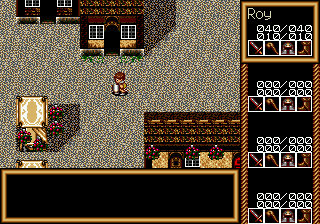
Traysia is a traditional role-playing game that hit the SEGA Genesis in 1992, published by Renovation Products. It came out on February 14 of that year, giving RPG fans a Valentine's Day launch. The story follows a young man named Roy who gets left in the Kingdom of Salon by his merchant uncle. He soon joins up with three other characters to take on a mysterious group of wizards from the north.
As Roy, you explore towns and dungeons, talking to NPCs and fighting random battles. Combat is turn-based, a standard for the era. You manage a party of four characters, each with their own strengths. Progression involves gaining levels, learning new spells, and acquiring better equipment. The game uses a traditional top-down perspective for exploration, similar to many console RPGs of the early 90s.
For retro fans, Traysia is an interesting piece of the Genesis RPG library. It doesn't break new ground but offers a solid, straightforward experience. Its relative obscurity makes it a nice find for collectors or emulation enthusiasts curious about Renovation's catalog. If you enjoy more linear, classic RPGs, it's worth a few hours of your time.
GAME INFO
- Platform
- SEGA Genesis
- Genre
- RPG
- Publisher
- Renovation Products
- Developer
- Telenet Japan
- Released
- 1992
- Players
- 1
- Region
- USA
How to play Traysia online
Getting started is straightforward. After a brief introduction, Roy is dropped off in Salon and you can move him around the town. Talk to everyone you meet - some give hints or items. Head north toward the first dungeon once you feel ready. The core loop involves exploring areas, triggering random battles, and managing your party's health and magic.
Combat is turn-based. Select actions for each character: attack, use magic, defend, or use an item. Pay attention to enemy weaknesses and heal often. You can save your progress at inns or certain points. Menus are in English, so navigation is easy. Equip new weapons and armor from shops to stay strong. Don't skip side conversations - they sometimes reveal optional paths or lore.
CONTROLS
Controls
- Arrow Keys: D-Pad / Movement
- X: A button
- S: B button
- Z: C button
- A: X button (6-button pad)
- Q: Y button (6-button pad)
- E: Z button (6-button pad)
- Enter: Start / Mode
Traysia FAQ
Which regions was Traysia released in?
Traysia was released in the USA by Renovation Products. No other regional releases are confirmed.
Is Traysia exclusive to SEGA Genesis or did it appear on other systems?
It was exclusive to the SEGA Genesis. There are no known ports to other platforms.
Is there anything iconic or memorable about Traysia?
It is relatively obscure but notable as an early Genesis RPG from Renovation. Its Valentine's Day release date and cover art give it a quirky identity.
You may also like
All SEGA Genesis games











GAME INFO
- Platform
- SEGA Genesis
- Genre
- RPG
- Publisher
- Renovation Products
- Developer
- Telenet Japan
- Released
- 1992
- Players
- 1
- Region
- USA
COMMENTS (0)
No comments yet. Be the first to share your thoughts.