The game loads when you press Play · press “Play Now” inside the game if it asks.
Gaiares (Japan, USA)
Gaiares
What is Gaiares?
- SEGA Genesis
- Shooter
- 5· 0 votes
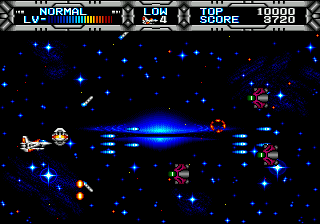
Gaiares is a horizontal shooter for the SEGA Genesis, originally released in 1990 in Japan and later in North America. It was developed by Telenet and published by Telenet Japan in Japan, with Renovation Products handling the US release. This title has earned a cult following over the years for its distinctive approach to weapon management.
The player pilots a ship called the Gaiares through side-scrolling levels. The standout mechanic is the LEE system, which lets you "leech" weapon pods from enemy ships and attach them to your own vessel. Each pod provides a different weapon, and you can combine them in various ways to create custom loadouts. This replaces the traditional power-up system found in most shooters of the era.
Gaiares remains appealing because of its unique weapon customization, which gives players a lot of control over their approach. It's a challenging game that demands quick reflexes, but the rewarding weapon system adds depth. For fans of 16-bit shooters, it's a hidden gem that stands apart from more conventional titles like Gradius or R-Type.
GAME INFO
- Platform
- SEGA Genesis
- Genre
- Shooter
- Publisher
- Renovation Products
- Developer
- Telenet Japan
- Released
- 1990
- Players
- 1
- Region
- Japan, USA
How to play Gaiares online
When you start Gaiares, you'll see a title screen. Press Start to begin. The game is horizontal scrolling. Your ship starts with a basic shot. Early enemies are straightforward. The key is to use the LEE system. When an enemy fires a weapon pod, carefully position your ship to absorb it. You'll see the pod attach to your ship. You can cycle through collected weapons with the A button (or X in this mapping) and fire with the B button.
If you're playing the Japanese version, menus are in Japanese but the game is playable without reading. The difficulty ramps up quickly, so practice memorizing enemy patterns. There are no traditional power-ups to collect beyond leeched weapons, and your custom loadout can be changed on the fly. Experiment with different pod combinations to find what works best for each stage.
CONTROLS
Controls
- Arrow Keys: D-Pad / Movement
- X: A button
- S: B button
- Z: C button
- A: X button (6-button pad)
- Q: Y button (6-button pad)
- E: Z button (6-button pad)
- Enter: Start / Mode
Gaiares FAQ
Is Gaiares exclusive to SEGA Genesis or did it appear on other systems?
Gaiares was released only on the SEGA Genesis. It did not appear on other home consoles or computers.
In what year was Gaiares originally released?
Gaiares originally released in 1990 in Japan, followed by a North American release in 1991.
Who developed Gaiares?
Gaiares was developed by Telenet, a Japanese game developer known for several Genesis titles.
You may also like
All SEGA Genesis games










GAME INFO
- Platform
- SEGA Genesis
- Genre
- Shooter
- Publisher
- Renovation Products
- Developer
- Telenet Japan
- Released
- 1990
- Players
- 1
- Region
- Japan, USA
COMMENTS (0)
No comments yet. Be the first to share your thoughts.