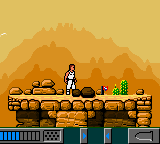
The game loads when you press Play · press “Play Now” inside the game if it asks.
Planet of the Apes (USA) (En,Fr,De,Es,It,Nl)
Planet of the Apes
Planet of the Apes Overview
- Game Boy Color
- Action
- 5· 0 votes
GAME INFO
- Platform
- Game Boy Color
- Genre
- Action
- Publisher
- Ubisoft
- Developer
- Visiware
- Released
- 2001
- Players
- 1
- Region
- USA, Europe
How to play Planet of the Apes online
After booting the ROM, you will see a title screen. Press Start to proceed. The game likely offers a language selection before the main menu. You begin controlling the main character from a side-scrolling perspective. Move with the D-Pad, jump with the A button, and attack or interact using the B button. The core loop involves exploring environments, avoiding or defeating enemies, and progressing through linear levels toward the end of the story.
Pay attention to platforms, gaps, and enemies that may require precise jumps or timing. Some sections may require you to push blocks, climb, or switch between foreground and background areas. The game saves progress automatically? Not all GBC titles had battery saves; check the manual or experiment. If you get stuck, try revisiting previous areas or interacting with objects using the B button.
CONTROLS
Controls
- Arrow Keys: D-Pad / Movement
- X: A button (jump / confirm)
- S: B button (run / attack / cancel)
- Enter: Start / Pause
- V: Select
Planet of the Apes FAQ
Who developed Planet of the Apes?
The development studio behind this Game Boy Color version is not widely documented. It is known to be a licensed product, but neither the programmer nor the artist have been clearly credited in public sources.
What makes Planet of the Apes stand out among Game Boy Color titles of its era?
It offers a completely original story with a different cast than the film it is based on, making it a unique adaptation rather than a direct port. The multi-language support was also somewhat uncommon for the system.
Is Planet of the Apes exclusive to Game Boy Color or did it appear on other systems?
A game with the same title and cover art was released on PlayStation and PC, but those versions feature a separate story and characters. The Game Boy Color version is distinct and essentially a different game.
You may also like
All Game Boy Color games











GAME INFO
- Platform
- Game Boy Color
- Genre
- Action
- Publisher
- Ubisoft
- Developer
- Visiware
- Released
- 2001
- Players
- 1
- Region
- USA, Europe
COMMENTS (0)
No comments yet. Be the first to share your thoughts.