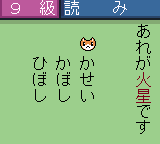
The game loads when you press Play · press “Play Now” inside the game if it asks.
Kanji Boy 3 (Japan)
Kanji Boy 3
What is Kanji Boy 3?
- Game Boy Color
- Educational
- 5· 0 votes
GAME INFO
- Platform
- Game Boy Color
- Genre
- Educational
- Players
- 1
- Region
- Japan
More Kanji Boy Games
Ready for another round? Explore more Kanji Boy games and console editions. Choose a game below to play it on its own page.
How to play Kanji Boy 3 online
Getting Started
When you start Kanji Boy 3, you will see a title screen followed by a menu in Japanese. Use the D-pad to highlight an option and press X (A button) to select. The menu likely offers choices like study mode, quiz mode, or a kanji list. If you cannot read the text, try selecting the first option to begin a lesson or drill.
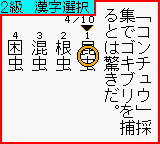
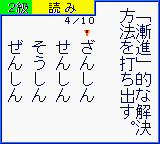
The core activity involves being shown a kanji character and then either identifying its reading, selecting the correct meaning from multiple choices, or tracing the stroke order. Use the D-pad to navigate answer choices and press X to confirm. The game provides feedback on correct and incorrect answers, helping you learn through repetition. Pressing S (B button) typically cancels or goes back.
Since the game is entirely in Japanese, a basic understanding of kana and kanji is helpful. Look for patterns: the menu options often include numbers or icons. If you get stuck, try experimenting with each menu entry. The game saves progress automatically or via a password system, so do not be afraid to restart a session.
CONTROLS
Controls
- Arrow Keys: D-Pad / Movement
- X: A button (jump / confirm)
- S: B button (run / attack / cancel)
- Enter: Start / Pause
- V: Select
Kanji Boy 3 FAQ
Does Kanji Boy 3 have a multiplayer or co-op mode?
Multiplayer functionality is not documented for Kanji Boy 3. The game appears to be a single-player educational tool with no link cable support or cooperative features.
Is Kanji Boy 3 exclusive to Game Boy Color or did it appear on other systems?
Kanji Boy 3 was released only for the Game Boy Color in Japan. It did not see releases on other platforms or regions.
Is there anything iconic or memorable about Kanji Boy 3?
The game is part of a series of kanji learning titles that are relatively obscure outside Japan. Its simple, focused design and portability made it a practical study aid during the Game Boy Color's lifetime.
You may also like
All Game Boy Color games











GAME INFO
- Platform
- Game Boy Color
- Genre
- Educational
- Players
- 1
- Region
- Japan
COMMENTS (0)
No comments yet. Be the first to share your thoughts.