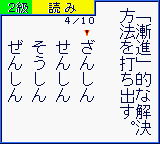
The game loads when you press Play · press “Play Now” inside the game if it asks.
Kanji Boy 2 (Japan)
Kanji Boy 2
Kanji Boy 2 - Educational Classic
- Game Boy Color
- Educational
- 5· 0 votes
GAME INFO
- Platform
- Game Boy Color
- Genre
- Educational
- Players
- 1
- Region
- Japan
More Kanji Boy Games
Ready for another round? Explore more Kanji Boy games and console editions. Choose a game below to play it on its own page.
How to play Kanji Boy 2 online
Getting Started
When you boot up Kanji Boy 2, you're greeted with a title screen and a menu in Japanese. Use the D-Pad to highlight "スタート" (start) and press X to begin. The game will ask you to select a difficulty level or grade range - these correspond to Japanese elementary school grade levels of kanji. Press A on a grade to confirm.
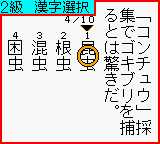
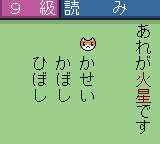
The core loop is simple: a kanji character appears on screen, and you must pick the correct reading from a list of four options (hiragana). A correct answer adds to your score and moves you to the next question; a wrong answer shows the correct reading briefly then continues. After a set number of questions, you'll see your score and can choose to continue or exit. Pay attention to the stroke order diagrams that occasionally appear - they can help distinguish similar kanji.
Because everything is in Japanese, it's helpful to know basic hiragana and katakana before jumping in. The game does not provide English language options. If you get stuck on a menu, try pressing B to go back or V to toggle options. Save is automatic after each session - just make sure not to turn off the console during a quiz, as progress may not be recorded.
CONTROLS
Controls
- Arrow Keys: D-Pad / Movement
- X: A button (jump / confirm)
- S: B button (run / attack / cancel)
- Enter: Start / Pause
- V: Select
Kanji Boy 2 FAQ
Is Kanji Boy 2 considered easy to pick up or challenging?
It depends heavily on your existing kanji knowledge. For learners at a low level, it can be quite demanding because it presents readings without much context. That said, the quiz structure is straightforward, so anyone with basic hiragana can attempt it.
Can players save progress in Kanji Boy 2?
Yes, the game uses a battery-backed save to keep your score and the last grade level attempted. There's no manual save option; it writes data automatically when you return to the title screen.
Who developed Kanji Boy 2?
The developer is not widely documented in English sources. Published by Jorudan, it was likely developed in-house, but no specific team name is commonly associated with this title.
You may also like
All Game Boy Color games











GAME INFO
- Platform
- Game Boy Color
- Genre
- Educational
- Players
- 1
- Region
- Japan
COMMENTS (0)
No comments yet. Be the first to share your thoughts.