The game loads when you press Play · press “Play Now” inside the game if it asks.
Kanji Boy (Japan)
Kanji Boy
Getting to Know Kanji Boy
- Game Boy Color
- Educational
- 5· 0 votes
GAME INFO
- Platform
- Game Boy Color
- Genre
- Educational
- Players
- 1
- Region
- Japan
More Kanji Boy Games
Ready for another round? Explore more Kanji Boy games and console editions. Choose a game below to play it on its own page.
How to play Kanji Boy online
Getting Started
The game boots into a title screen showing Doraemon and the kanji theme. Press Start to proceed. The main menu is entirely in Japanese, but the options are typically arranged in a list: the first option usually begins the study mode, the second may be a mini-game, and later ones lead to options or a save/continue function. D-Pad moves the cursor and the A button (X key) confirms selections. If you see an image of Doraemon pointing, that is often the confirmation prompt.
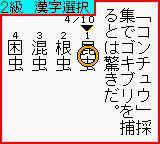
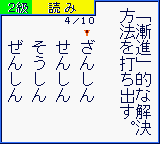
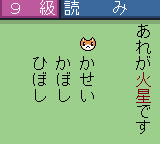
Once inside a study mode, you are presented with a kanji character and a set of multiple-choice answers in Japanese. Read the kanji and pick the correct reading or meaning from the list. Use the D-Pad to highlight your answer and press A to lock it in. Correct answers earn points and a cheerful animation; wrong ones show a correction screen. The game cycles through a preset list of kanji, gradually increasing difficulty. You can exit back to the menu at any time by pressing the B button (S key) and confirming.
There is no time limit during quizzes, so take your time. The game automatically saves progress after each session if you choose the save option from the menu. For absolute beginners, a romaji cheat sheet for the menu labels can be a huge help. If you are learning kanji, this game functions as a low-pressure drill that rewards perseverance. The mini-game modes are simple, often requiring quick recognition or writing strokes, but the core experience remains the same: read, pick, learn.
CONTROLS
Controls
- Arrow Keys: D-Pad / Movement
- X: A button (jump / confirm)
- S: B button (run / attack / cancel)
- Enter: Start / Pause
- V: Select
Kanji Boy FAQ
What makes Kanji Boy stand out among Game Boy Color titles of its era?
It integrates a popular anime license with a structured kanji curriculum, making repetitive study feel like a game. The character animations and sound effects provide positive reinforcement uncommon in most educational software of the time.
What type of game is Kanji Boy?
It is an educational game focused on teaching kanji characters through quizzes and simple exercises. The genre is strictly learning-oriented, with no action or story progression beyond tracking study progress.
Is Kanji Boy exclusive to Game Boy Color or did it appear on other systems?
This specific title only released for the Game Boy Color in Japan. It is part of the Doraemon no Study Boy series, but other games in that series appeared on different consoles like the Famicom and Super Famicom.
You may also like
All Game Boy Color games











GAME INFO
- Platform
- Game Boy Color
- Genre
- Educational
- Players
- 1
- Region
- Japan
COMMENTS (0)
No comments yet. Be the first to share your thoughts.