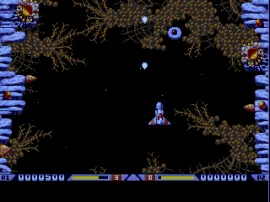
The game loads when you press Play · press “Play Now” inside the game if it asks.
Xenon 2 Megablast (Europe)
Xenon 2 Megablast
Inside Xenon 2 Megablast
- SEGA Genesis
- Shooter
- 5· 0 votes
GAME INFO
- Platform
- SEGA Genesis
- Genre
- Shooter
- Players
- 1
- Region
- Europe
How to play Xenon 2 Megablast online
CONTROLS
Controls
- Arrow Keys: D-Pad / Movement
- X: A button
- S: B button
- Z: C button
- A: X button (6-button pad)
- Q: Y button (6-button pad)
- E: Z button (6-button pad)
- Enter: Start / Mode
Xenon 2 Megablast FAQ
What makes Xenon 2 Megablast stand out among SEGA Genesis titles of its era?
Its vibrant, detailed graphics and a memorable chiptune soundtrack set it apart from many other Genesis shooters. The weapon upgrade system, where you buy between stages, adds a strategic layer that was less common in pure arcade ports of the time.
Is Xenon 2 Megablast exclusive to SEGA Genesis or did it appear on other systems?
No, it originally released on the Amiga and Atari ST in 1989 and later appeared on several platforms including the Game Boy, MS-DOS, and the SEGA Genesis. The Genesis version is one of several ports.
Who developed Xenon 2 Megablast?
The original game was created by The Bitmap Brothers, but the specific development team behind the SEGA Genesis port is not widely documented. The European release was likely handled by a third-party studio under license.
You may also like
All SEGA Genesis games











GAME INFO
- Platform
- SEGA Genesis
- Genre
- Shooter
- Players
- 1
- Region
- Europe
COMMENTS (0)
No comments yet. Be the first to share your thoughts.