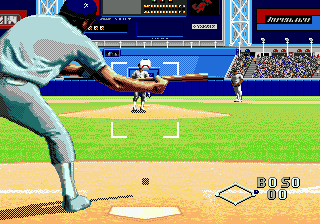
The game loads when you press Play · press “Play Now” inside the game if it asks.
World Series Baseball (USA)
World Series Baseball
Getting to Know World Series Baseball
- SEGA Genesis
- Sports
- 5· 0 votes
GAME INFO
- Platform
- SEGA Genesis
- Genre
- Sports
- Publisher
- Sega of America
- Developer
- BlueSky Software
- Released
- 1994
- Players
- 1-2
- Region
- USA
How to play World Series Baseball online
Getting Started
From the title screen press Start to enter the main menu. First choose between Exhibition mode for a single game or Season mode to play a full schedule. You then select a home team, an away team, and optionally set the number of innings (standard is 9). The game loads the first half inning.
On defense you control the pitcher: aim with the D-Pad and press X to throw. Use different pitches by pressing a direction before the throw - for example up for a fastball, down for a curve. The catcher's glove shows the desired location. After the ball is hit, you control the nearest fielder automatically; run to the ball and press the appropriate base button to throw. On offense you control the batter: press X to swing and time the pitch. Once on base, use the D-Pad to lead off and press S to sprint.
Core loop: pitch, field, bat, run - standard baseball. Pay attention to the on-screen indicators for ball count and strikes. The game does not have an in-game tutorial, but the controls are intuitive for anyone familiar with baseball. If you are new, start with Exhibition on rookie difficulty to learn the timing of swings and pitches.
CONTROLS
Controls
- Arrow Keys: D-Pad / Movement
- X: A button
- S: B button
- Z: C button
- A: X button (6-button pad)
- Q: Y button (6-button pad)
- E: Z button (6-button pad)
- Enter: Start / Mode
World Series Baseball FAQ
Who developed World Series Baseball?
Sega developed World Series Baseball for the Genesis, with internal teams handling both design and programming.
What type of game is World Series Baseball?
It is a sports simulation focused on delivering a realistic baseball experience within the hardware limits of the Genesis.
Is there anything iconic or memorable about World Series Baseball?
This title kicked off Sega's long-running World Series Baseball series and was one of the first Genesis sports games to include a full season mode with stat tracking.
You may also like
All SEGA Genesis games











GAME INFO
- Platform
- SEGA Genesis
- Genre
- Sports
- Publisher
- Sega of America
- Developer
- BlueSky Software
- Released
- 1994
- Players
- 1-2
- Region
- USA
COMMENTS (0)
No comments yet. Be the first to share your thoughts.