The game loads when you press Play · press “Play Now” inside the game if it asks.
World Series Baseball '96 (USA)
World Series Baseball '96
About World Series Baseball '96
- SEGA Genesis
- Sports
- 5· 0 votes
GAME INFO
- Platform
- SEGA Genesis
- Genre
- Sports
- Released
- 1996
- Players
- 1-2
- Region
- USA
How to play World Series Baseball '96 online
Getting Started
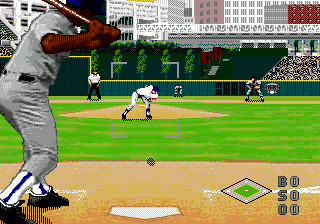
When you boot up World Series Baseball '96, you're greeted by a title screen then a menu to choose between exhibition or season play. Pick your team and the opponent, then jump into the game. The core loop is simple: when you're batting, wait for the pitch and press the A button (X key) to swing, timing it to connect. When pitching, use the D-pad to aim and select a pitch type with the action buttons, then press A to throw.
Fielding happens automatically for routine plays, but you can take control by moving the fielder with the D-pad and pressing the action button to throw to a base. Pay attention to the batter-pitcher matchups - each hitter has strengths, and you can adjust your strategy by changing pitchers via the start menu. If you're new to baseball sims, start with exhibition mode to get a feel for the timing and controls before jumping into a long season.
CONTROLS
Controls
- Arrow Keys: D-Pad / Movement
- X: A button
- S: B button
- Z: C button
- A: X button (6-button pad)
- Q: Y button (6-button pad)
- E: Z button (6-button pad)
- Enter: Start / Mode
World Series Baseball '96 FAQ
Who developed World Series Baseball '96?
The original developer is not widely documented in commonly available sources. This game was released for the Sega Genesis in 1996, but the studio behind it hasn't been reliably recorded.
Does World Series Baseball '96 have a multiplayer or co-op mode?
Yes, the game supports two-player versus mode. You and a friend can pick different teams and compete in a standard baseball game head-to-head.
Is World Series Baseball '96 considered easy to pick up or challenging?
It leans towards easy to pick up because the basic controls are straightforward. However, mastering the timing for hitting and pitching against better opponents can provide a moderate challenge.
You may also like
All SEGA Genesis games











GAME INFO
- Platform
- SEGA Genesis
- Genre
- Sports
- Released
- 1996
- Players
- 1-2
- Region
- USA
COMMENTS (0)
No comments yet. Be the first to share your thoughts.