The game loads when you press Play · press “Play Now” inside the game if it asks.
World Series Baseball '95 (USA)
World Series Baseball '95
What is World Series Baseball '95?
- SEGA Genesis
- Sports
- 5· 0 votes
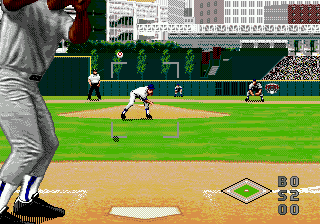
World Series Baseball '95 is a baseball simulation for the Sega Genesis that hit shelves in the United States under the World Series Baseball franchise. Part of a series that aimed to bring realistic baseball action to the 16-bit era, this title stuck closely to the core sport without adding fantasy or arcade twists. It arrived during a time when sports games on the Genesis were competing heavily for accuracy and licensing, and it earned a reputation for solid gameplay among fans of the genre.
You pick a real MLB team from the available roster and play through a standard nine-inning game. Pitching and batting rely on timing and positioning, while fielding and base running require quick reflexes with the D-pad and buttons. The game simulates pitch speeds, hitting zones, and player attributes, but it keeps controls simple enough to jump into a match quickly. You can play against the computer or challenge a second player locally.
What makes this game worth checking out today is its straightforward, no-nonsense approach to baseball. It doesn't try to dazzle with unnecessary fluff - it just gives you a solid simulation that respects the sport. For retro baseball fans, it sits comfortably in the Genesis library alongside other sports titles, offering a reliable pick-up-and-play experience that holds up when you want a quick game without modern distractions.
GAME INFO
- Platform
- SEGA Genesis
- Genre
- Sports
- Publisher
- Sega of America
- Developer
- Sega Sports R&D
- Released
- 1994
- Players
- 1-2
- Region
- USA
How to play World Series Baseball '95 online
Getting started begins with the title screen where you press Start to reach the main menu. From there, select the game mode: exhibition matches, season play, or options. Use the D-pad to highlight your choice and confirm with the A or B button. Once you pick a team, you will set the lineups before the first pitch.
The core loop involves pitching and batting across nine innings. On the mound, use the D-pad to choose the pitch type and location, then press a button to throw. At the plate, time your swing by pressing the B or A button as the ball approaches. After contact, the game switches to fielding or running, where you use the D-pad to move players and buttons to throw or dive.
New players should start with an exhibition match to learn the timing and controls. Pay attention to the pitch count and batter tendencies. The game does not have a tutorial, but the controls are intuitive once you experiment for a few innings. If you get stuck, the options menu lets you adjust difficulty and game length.
CONTROLS
Controls
- Arrow Keys: D-Pad / Movement
- X: A button
- S: B button
- Z: C button
- A: X button (6-button pad)
- Q: Y button (6-button pad)
- E: Z button (6-button pad)
- Enter: Start / Mode
World Series Baseball '95 FAQ
Can players save progress in World Series Baseball '95?
It is not widely documented whether this game includes a save feature. Many Genesis baseball games from the era relied on passwords to continue a season or simply did not save progress at all.
Is World Series Baseball '95 exclusive to SEGA Genesis or did it appear on other systems?
The game appears to be exclusive to the SEGA Genesis, though other entries in the World Series Baseball franchise appeared on later platforms. No ports to other contemporary consoles have been widely recorded.
In what year was World Series Baseball '95 originally released?
The title strongly suggests a 1995 release, but exact documentation is uncommon. Most archival sources list it as a 1995 release for the SEGA Genesis in North America.
You may also like
All SEGA Genesis games











GAME INFO
- Platform
- SEGA Genesis
- Genre
- Sports
- Publisher
- Sega of America
- Developer
- Sega Sports R&D
- Released
- 1994
- Players
- 1-2
- Region
- USA
COMMENTS (0)
No comments yet. Be the first to share your thoughts.