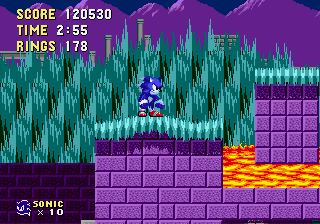
The game loads when you press Play · press “Play Now” inside the game if it asks.
Werehog sonic in sonic 1 v2 By Axel
Werehog sonic in sonic 1 v2 By Axel
Werehog sonic in sonic 1 v2 By Axel: Genesis Platformer
- SEGA Genesis
- Platformer
- ROM Hack
- 5· 0 votes
Unofficial ROM hack. The notes below come from community sources and have not been verified against the patch itself, so levels, mechanics and features may differ from what is described.
GAME INFO
- Platform
- SEGA Genesis
- Genre
- Platformer
- Players
- 1
- Version
- v2
- Based on
- Sonic the Hedgehog
- Made by
- Axel
More Sonic the Hedgehog Games
Ready for another round? Explore more Sonic the Hedgehog games and console editions. Choose a game below to play it on its own page.






How to play Werehog sonic in sonic 1 v2 By Axel online
Getting Started
Load the ROM in an emulator and press Enter to start. You'll see the title screen with the modified Werehog logo. Press Start again to go to the options screen where you can set lives and difficulty, then begin the game in Green Hill Zone.
Your goal is to reach the end of each act within the time limit. Collect rings for protection and extra lives. Watch out for spikes and bottomless pits. The Werehog sprite has a larger hitbox than normal Sonic, so jumps might feel slightly off - practice the timing. You can use the D-pad to move, X to jump, and S to spin dash or roll. The Special Stages are the same as Sonic 1.
If you get stuck, remember that this is essentially Sonic 1 with a new coat of paint. Use strategy from the original game - memorize enemy patterns, roll into slopes for speed, and use the checkpoints. There's no save feature, so complete the game in one sitting or use emulator save states.
CONTROLS
Controls
- Arrow Keys: D-Pad / Movement
- X: A button
- S: B button
- Z: C button
- A: X button (6-button pad)
- Q: Y button (6-button pad)
- E: Z button (6-button pad)
- Enter: Start / Mode
Werehog sonic in sonic 1 v2 By Axel FAQ
Is Werehog sonic in sonic 1 v2 By Axel exclusive to SEGA Genesis or did it appear on other systems?
This hack was built exclusively for the Sega Genesis/Mega Drive and is not available on any other platform by design. It runs on original hardware or emulators and has not been ported to other systems.
Does Werehog sonic in sonic 1 v2 By Axel have a multiplayer or co-op mode?
No multiplayer or co-op mode is present. The hack is strictly a single-player experience, just like the original Sonic 1.
Roughly how long does it take to finish Werehog sonic in sonic 1 v2 By Axel?
The length is comparable to the original Sonic 1 - roughly one to two hours for a casual playthrough. Exact completion time depends on familiarity with the levels and whether you chase all Chaos Emeralds.
You may also like
All SEGA Genesis games











GAME INFO
- Platform
- SEGA Genesis
- Genre
- Platformer
- Players
- 1
- Version
- v2
- Based on
- Sonic the Hedgehog
- Made by
- Axel
COMMENTS (0)
No comments yet. Be the first to share your thoughts.