The game loads when you press Play · press “Play Now” inside the game if it asks.
Uzu Keobukseon (Korea)
Uzu Keobukseon
Inside Uzu Keobukseon
- SEGA Genesis
- Shooter
- 5· 0 votes
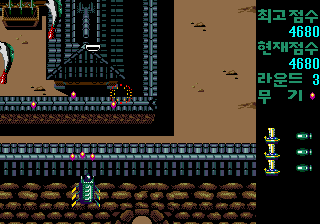
Uzu Keobukseon (우주거북선) is a vertical scrolling shooter released for the Sega Mega Drive in 1993. Developed by Samsung, it was a Korean exclusive release, meaning it never saw a Western launch. The title translates to 'Space Turtle Ship', giving a clear hint about the unique theme of the game.
Players take control of a distinctive space-age battle cruiser designed as a turtle ship, complete with sails and oars. The gameplay follows the standard vertical scrolling shooter formula: dodge enemy fire, blast incoming foes, and collect power-ups. The action spans eight different stages, each presenting new enemy patterns and backgrounds.
For collectors of rare regional releases, Uzu Keobukseon is a fascinating piece of Korean gaming history. It stands out not for groundbreaking mechanics but for its unusual visual theme, merging traditional Korean imagery with futuristic space combat. While it may not rival genre heavyweights like Thunder Force or Gradius, it offers a solid and unique shooter experience that is well worth a look for retro enthusiasts.
GAME INFO
- Platform
- SEGA Genesis
- Genre
- Shooter
- Developer
- Samsung Group
- Released
- 1993
How to play Uzu Keobukseon online
When you start Uzu Keobukseon, you'll be greeted by a title screen and a menu likely in Korean. Press Start to begin. Your ship starts at the bottom of the screen automatically scrolling upward. Use the D-Pad to move your turtle ship and the B button to fire your main weapon. Enemy waves approach from above; destroy them while avoiding their bullets. Collect power-ups that appear after defeating certain enemies to upgrade your firepower.
The game has eight stages, each ending with a boss encounter. There is no save feature; you must complete the game in one sitting. The core loop involves memorizing enemy patterns, managing power-ups, and survival. Practice makes perfect, so do not be discouraged by early losses.
CONTROLS
Controls
- Arrow Keys: D-Pad / Movement
- X: A button
- S: B button
- Z: C button
- A: X button (6-button pad)
- Q: Y button (6-button pad)
- E: Z button (6-button pad)
- Enter: Start / Mode
Uzu Keobukseon FAQ
What makes Uzu Keobukseon stand out among SEGA Genesis titles of its era?
Its Korean exclusive status and unusual turtle ship theme, blending traditional design with sci-fi shooting, set it apart from typical shooters.
Is Uzu Keobukseon exclusive to SEGA Genesis or did it appear on other systems?
The game was released only for the Sega Mega Drive in Korea. No ports or re-releases on other platforms are documented.
Can players save progress in Uzu Keobukseon?
The game lacks save functionality, requiring players to finish it in one sitting, as is common for shooters of this generation.
You may also like
All SEGA Genesis games











GAME INFO
- Platform
- SEGA Genesis
- Genre
- Shooter
- Developer
- Samsung Group
- Released
- 1993
COMMENTS (0)
No comments yet. Be the first to share your thoughts.