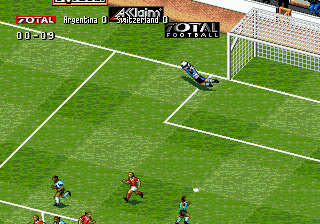
The game loads when you press Play · press “Play Now” inside the game if it asks.
Total Football (Europe)
Total Football
Total Football - Sports Classic
- SEGA Genesis
- Sports
- 5· 0 votes
GAME INFO
- Platform
- SEGA Genesis
- Genre
- Sports
- Developer
- Domark Software
- Released
- 1995
- Region
- Europe
How to play Total Football online
CONTROLS
Controls
- Arrow Keys: D-Pad / Movement
- X: A button
- S: B button
- Z: C button
- A: X button (6-button pad)
- Q: Y button (6-button pad)
- E: Z button (6-button pad)
- Enter: Start / Mode
Total Football FAQ
Which regions was Total Football released in?
Total Football was specifically released in Europe for the SEGA Genesis, as indicated by its title. There is no documented release in Japan or North America, making it a regional title aimed at the European market during the early 1990s.
Is there anything iconic or memorable about Total Football?
The game is not widely remembered for any standout features, but it is notable for being a generic soccer title that relied on the popularity of the sport rather than licensed teams or innovative mechanics. Its main draw is typical 16-bit football gameplay without frills, appealing to collectors who want to experience every sports game on the platform.
Does Total Football have a multiplayer or co-op mode?
Yes, it includes a two-player versus mode, allowing a second player to join and control the opposing team. This is standard for Genesis soccer games and does not feature co-op play; instead, it is head-to-head competition. The multiplayer mode is available on the same console with both players using separate controllers.
You may also like
All SEGA Genesis games











GAME INFO
- Platform
- SEGA Genesis
- Genre
- Sports
- Developer
- Domark Software
- Released
- 1995
- Region
- Europe
COMMENTS (0)
No comments yet. Be the first to share your thoughts.