The game loads when you press Play · press “Play Now” inside the game if it asks.
Tecmo Super Hockey (USA)
Tecmo Super Hockey
Inside Tecmo Super Hockey
- SEGA Genesis
- Sports
- 5· 0 votes
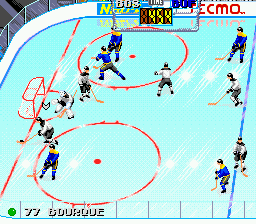
Tecmo Super Hockey is an ice hockey game for the Sega Genesis, developed and published by Tecmo. It was released in North America in 1994 as the company's entry into the hockey genre on the system. A planned SNES version was canceled, making the Genesis edition the only commercial release from Tecmo for hockey on 16-bit consoles.
The game puts you in control of a hockey team in a five-on-five format with standard rules. You skate, pass, shoot, and check opponents using the Genesis controller. The gameplay is arcade-style with a focus on fast action and physical play. There are modes for exhibition, playoffs, and a full season, with roster management and player statistics tracked over the year.
Compared to EA's NHL series, Tecmo Super Hockey feels simpler and more accessible, with a lighter simulation tilt. It's worth trying for retro fans who enjoy quick, responsive hockey games without the depth of modern sports sims. The cancelled SNES version adds a bit of rarity, but the Genesis game stands on its own as a solid, uncomplicated puck title from a developer better known for football and other sports.
GAME INFO
- Platform
- SEGA Genesis
- Genre
- Sports
- Released
- 1994
- Players
- 1-2
- Region
- USA
How to play Tecmo Super Hockey online
Getting Started
When you boot up Tecmo Super Hockey, you'll first see a title screen where you can press Start to move to the main menu. From there, choose Exhibition, Playoffs, or Season mode. In Exhibition, you pick a team, then select a home and away team to begin a single game. The core loop is playing through three 20-minute periods (adjustable in options) using real-time hockey action.
On offense, use the D-Pad to control your skater's direction, the B button to pass, and the Y or A buttons to shoot. On defense, you can check opponents by pressing the B button near them, or poke check with another button. Hold the L or R shoulder button to sprint for short bursts. The game has a simple face-off system; press the A button at the right moment to win the draw.
New players should start with Exhibition on the easiest difficulty to get a feel for skating and checking. Pay attention to the puck carrier indicator - a small arrow above your player's head. The controls are responsive but take a little practice to aim passes and shots effectively. Teammates are controlled by the computer and will change lines automatically, so focus on positioning and timely passes.
CONTROLS
Controls
- Arrow Keys: D-Pad / Movement
- X: A button
- S: B button
- Z: C button
- A: X button (6-button pad)
- Q: Y button (6-button pad)
- E: Z button (6-button pad)
- Enter: Start / Mode
Tecmo Super Hockey FAQ
Who developed Tecmo Super Hockey?
Tecmo developed the game internally. The company was already known for its sports titles like Tecmo Super Bowl, and this hockey entry was their attempt to enter the hockey genre on the Genesis.
Which regions was Tecmo Super Hockey released in?
The game was released in North America under the title Tecmo Super Hockey. There is no documented release in Japan or Europe, making it a US-exclusive commercial release.
Is Tecmo Super Hockey considered easy to pick up or challenging?
It is fairly easy to pick up thanks to its arcade-style controls and simplified rules. However, the AI on higher difficulty levels can be punishing, and mastering the timing of shots and checks adds a moderate challenge.
You may also like
All SEGA Genesis games











GAME INFO
- Platform
- SEGA Genesis
- Genre
- Sports
- Released
- 1994
- Players
- 1-2
- Region
- USA
COMMENTS (0)
No comments yet. Be the first to share your thoughts.