The game loads when you press Play · press “Play Now” inside the game if it asks.
Tecmo Super Baseball (USA)
Tecmo Super Baseball
Tecmo Super Baseball - Sports Classic
- SEGA Genesis
- Sports
- 5· 0 votes
Tecmo Super Baseball hit the SEGA Genesis in 1994, bringing MLBPA-licensed action to the 16-bit era. This is a proper baseball simulation, not an arcade-style home run derby. It came out alongside the SNES version, giving Genesis owners a solid alternative to EA Sports' Triple Play series. The game was developed and published by Tecmo, the same studio behind the classic Tecmo Bowl football titles, so you know they understood how to make sports games click on this hardware.
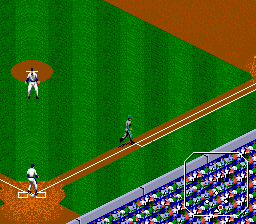
What you actually do in Tecmo Super Baseball is manage a full nine-inning ballgame. You pick a team from the licensed MLBPA roster, then step onto the field to pitch, bat, and field. Pitching involves selecting a pitch type and aiming with the D-pad, while batting requires timing your swing to the pitch's speed and location. The game tracks real stats and features a season mode where you can play through a full schedule. It's a straightforward baseball sim, no weird power-ups or mini-games, just straight baseball.
Today Tecmo Super Baseball is worth a look if you want a no-nonsense baseball game from the mid-90s. It doesn't have the flash of something like Ken Griffey Jr. Presents Major League Baseball, but it holds up as a solid simulation with accurate player ratings and a clean interface. If you grew up playing Tecmo Bowl and wished they'd made a baseball game, this is exactly that. It's niche but satisfying for fans of the era's sports titles.
GAME INFO
- Platform
- SEGA Genesis
- Genre
- Sports
- Publisher
- Tecmo
- Developer
- Tecmo
- Released
- 1994
- Players
- 1-2
- Region
- USA
How to play Tecmo Super Baseball online
First, load the ROM and press Enter to reach the title screen. Use the D-pad to highlight options like Exhibition, Season, or Options, then press X to select. You will pick your team and the opposing team from the league list. Once the game starts, you control the pitcher by selecting a pitch type (fastball, curve, etc.) with the Y, X, and A buttons, then aiming with the D-pad and pressing B to throw.
When your team is at bat, time your swing by pressing B when the pitch comes in. The cursor shows where the ball is headed. Use the D-pad to move your baserunners when the ball is in play. Fielding is automatic but you can manually control outfielders with the D-pad to chase down fly balls. The core loop is playing nine innings, swapping sides each half, and trying to outscore the opponent. There is no tutorial, so expect to learn by trial and error, but the interface is clear enough. If you want to reset or exit, press Select + Start simultaneously.
CONTROLS
Controls
- Arrow Keys: D-Pad / Movement
- X: A button
- S: B button
- Z: C button
- A: X button (6-button pad)
- Q: Y button (6-button pad)
- E: Z button (6-button pad)
- Enter: Start / Mode
Tecmo Super Baseball FAQ
What type of game is Tecmo Super Baseball?
Tecmo Super Baseball is a sports simulation that replicates Major League Baseball with licensed teams and players. It focuses on realistic pitching, batting, and fielding mechanics rather than arcade action.
Does Tecmo Super Baseball have a multiplayer or co-op mode?
Yes, the game supports two-player versus mode, letting you play head-to-head on the same console. There is no co-op mode for playing on the same team.
Who developed Tecmo Super Baseball?
Tecmo developed and published the game. The same studio was known for the Tecmo Bowl series and other sports titles in the 1990s.
You may also like
All SEGA Genesis games











GAME INFO
- Platform
- SEGA Genesis
- Genre
- Sports
- Publisher
- Tecmo
- Developer
- Tecmo
- Released
- 1994
- Players
- 1-2
- Region
- USA
COMMENTS (0)
No comments yet. Be the first to share your thoughts.