The game loads when you press Play · press “Play Now” inside the game if it asks.
TaleSpin (USA, Europe)
TaleSpin
TaleSpin: Genesis Shooter
- SEGA Genesis
- Shooter
- 5· 0 votes
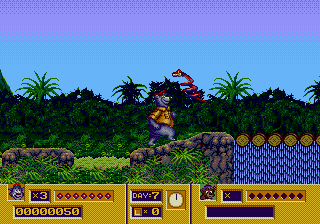
TaleSpin for the SEGA Genesis is a side-scrolling shooter released in 1992 in North America and Europe. It was developed and published by Capcom as part of their run of Disney-licensed games from the late 80s and early 90s. The game is based on the Disney cartoon TaleSpin, which itself reimagines characters from The Jungle Book in an aviation-themed setting.
You control Baloo the bear as he pilots his plane, the Sea Duck, through horizontally scrolling stages. The goal is to shoot down enemy aircraft and avoid obstacles while collecting power-ups that upgrade your weapons or restore health. The controls are responsive and the action is fast-paced, with each level ending in a boss fight against a character from the show.
TaleSpin holds up as a solid arcade-style action game with colorful pixel art that captures the cartoon's look. Its tight controls and satisfying shooting mechanics make it a fun pick for fans of classic Capcom or Disney games. While it's not a deep or lengthy title, it's a neat piece of the Genesis library that still plays well today.
GAME INFO
- Platform
- SEGA Genesis
- Genre
- Shooter
- Publisher
- Capcom
- Released
- 1992
- Players
- 1
- Region
- USA, Europe
How to play TaleSpin online
To start playing, load the game and press Enter to skip any title sequences. You will see a stage select screen; choose any available level. The core gameplay involves flying the Sea Duck left to right across the screen. Use the Arrow Keys to move in all directions and press S to fire your main weapon at incoming enemies. Press X to perform a jump or special action when on ground segments.
Your health is displayed at the top; losing it all costs a life. Collect power-ups dropped by certain enemies to increase your firepower or restore health. Each stage ends with a boss that requires pattern recognition to defeat. The game is entirely single-player, so no co-op or versus modes are present.
CONTROLS
Controls
- Arrow Keys: D-Pad / Movement
- X: A button
- S: B button
- Z: C button
- A: X button (6-button pad)
- Q: Y button (6-button pad)
- E: Z button (6-button pad)
- Enter: Start / Mode
TaleSpin FAQ
Who developed TaleSpin?
Capcom developed and published TaleSpin for the SEGA Genesis. It was one of several Disney-licensed titles they created during the early 1990s.
Is TaleSpin exclusive to SEGA Genesis or did it appear on other systems?
TaleSpin was released on multiple platforms including the NES, Game Boy, and Amiga. The Genesis version is one of several ports and features its own unique graphics and sound.
Does TaleSpin have a multiplayer or co-op mode?
TaleSpin is strictly a single-player experience. There is no cooperative or competitive multiplayer mode included.
You may also like
All SEGA Genesis games











GAME INFO
- Platform
- SEGA Genesis
- Genre
- Shooter
- Publisher
- Capcom
- Released
- 1992
- Players
- 1
- Region
- USA, Europe
COMMENTS (0)
No comments yet. Be the first to share your thoughts.