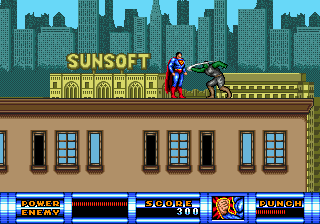
The game loads when you press Play · press “Play Now” inside the game if it asks.
Superman (USA) (Beta)
Superman
Getting to Know Superman
- SEGA Genesis
- Action
- Beta
- 5· 0 votes
GAME INFO
- Platform
- SEGA Genesis
- Genre
- Action
- Region
- USA
- Version
- Beta
How to play Superman online
Getting Started
After launching the game, press Enter to bypass the title screen. You'll likely see a menu or level select - use Arrow Keys and press X to choose an option. Since this is a beta build, menus may be sparse or text may appear incomplete.
Once in-game, use Arrow Keys to move Superman left/right and climb or descend. Press S to attack with punches or special moves, and X to jump. Experiment with different button combinations to find any unique abilities like flight or heat vision, but be prepared for possible glitches or missing functions typical of beta software.
The core objective is to reach the end of each stage, defeating enemies along the way. Watch your health bar and collect any power-ups that appear. If the game becomes unresponsive or crashes, that's normal for an unfinished build - save your progress often using save states in the emulator.
CONTROLS
Controls
- Arrow Keys: D-Pad / Movement
- X: A button
- S: B button
- Z: C button
- A: X button (6-button pad)
- Q: Y button (6-button pad)
- E: Z button (6-button pad)
- Enter: Start / Mode
Superman FAQ
Is Superman exclusive to SEGA Genesis or did it appear on other systems?
The commercial version of Superman was released only for the Sega Genesis. No official ports to other home consoles or computers were produced at the time.
In what year was Superman originally released?
The final commercial release of Superman for Genesis came out in 1992, but the exact year of this specific beta build is not publicly documented.
Who developed Superman?
The game was developed and published by SunSoft, a division of Sun Corporation known for several Genesis titles in the early 90s.
You may also like
All SEGA Genesis games
GAME INFO
- Platform
- SEGA Genesis
- Genre
- Action
- Region
- USA
- Version
- Beta
COMMENTS (0)
No comments yet. Be the first to share your thoughts.