CHOOSE A VERSION
4 versions · same consoleChoose an original release, regional version, revision, bootleg or clearly labelled ROM hack/mod, then press Play. Hacks may change the gameplay. Switching versions restarts the player.
Selected: Default · USA · En,Ja · v1.3
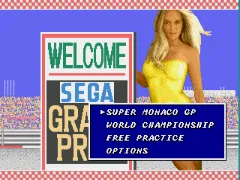
The game loads when you press Play · press “Play Now” inside the game if it asks.
Super Monaco GP (USA) (En,Ja) (v1.3)
Super Monaco GP
Getting to Know Super Monaco GP
- SEGA Genesis
- Racing
- 5· 0 votes
GAME INFO
- Platform
- SEGA Genesis
- Genre
- Racing
- Released
- 1991
- Players
- 1
- Version
- v1.3
How to play Super Monaco GP online
Getting Started
When you boot up Super Monaco GP, you're taken to a title screen where you can choose between a single race (Quick Race) and a full championship season. Select your preferred mode using the Start button. The game defaults to automatic transmission, but you can switch to manual in the options menu for finer control over gear changes - manual gives a slight speed advantage once you learn the timing.
Your goal in each race is to qualify on the grid and then finish as high as possible. The core loop involves accelerating down straights, braking before turns, and shifting gears (if manual) to maintain optimal revs. Pay attention to the track map at the top of the screen to anticipate upcoming corners. The game uses a split-screen display on single player, showing your car from behind with a rearview mirror inset.
New players should start with Quick Race on a simple track like Australia or Canada to get a feel for the handling. The AI opponents are aggressive but predictable - you can often draft behind them to gain speed before overtaking. If you spin out, hold the brake and steer gently to recover. Each race lasts about 3-5 minutes, so you can pick up and play a few laps without a big time commitment.
CONTROLS
Controls
- Arrow Keys: D-Pad / Movement
- X: A button
- S: B button
- Z: C button
- A: X button (6-button pad)
- Q: Y button (6-button pad)
- E: Z button (6-button pad)
- Enter: Start / Mode
Super Monaco GP FAQ
Roughly how long does it take to finish Super Monaco GP?
A single race can be completed in under five minutes, while a full championship season (16 races) takes roughly 1-2 hours depending on your skill and whether you use continues. Finishing first in the championship unlocks the secret "Super" car and a credits sequence.
Which regions was Super Monaco GP released in?
The game launched in Japan and North America, with the USA release bearing the title "Super Monaco GP" and supporting both English and Japanese text. A European version also exists under the same name, but the v1.3 revision is specifically tied to the North American/Japanese multi-language release.
Who developed Super Monaco GP?
The game was developed by Sega's AM2 division, the same team behind the original arcade hit. Sega itself handled publishing for the Genesis port.
You may also like
All SEGA Genesis games











GAME INFO
- Platform
- SEGA Genesis
- Genre
- Racing
- Released
- 1991
- Players
- 1
- Version
- v1.3
COMMENTS (0)
No comments yet. Be the first to share your thoughts.