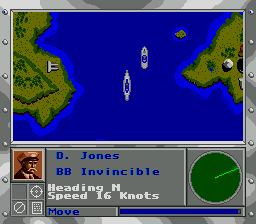
The game loads when you press Play · press “Play Now” inside the game if it asks.
Super Battleship (USA)
Super Battleship
Super Battleship - Strategy Classic
- SEGA Genesis
- Strategy
- 5· 0 votes
GAME INFO
- Platform
- SEGA Genesis
- Genre
- Strategy
- Publisher
- Mindscape
- Released
- 1993
- Region
- USA
How to play Super Battleship online
CONTROLS
Controls
- Arrow Keys: D-Pad / Movement
- X: A button
- S: B button
- Z: C button
- A: X button (6-button pad)
- Q: Y button (6-button pad)
- E: Z button (6-button pad)
- Enter: Start / Mode
Super Battleship FAQ
Who developed Super Battleship?
The developer for the SEGA Genesis version is not widely documented, but the game was published by Mindscape. It was produced alongside versions for other home consoles and handhelds during the early 1990s.
What makes Super Battleship stand out among SEGA Genesis titles of its era?
Its inclusion of both the classic board game and a deeper naval strategy simulation in a single cartridge gives it an unusual dual identity. Most board game adaptations stick to the original rules, but Super Battleship adds a distinct, more complex mode that rewards strategic thinking.
Is Super Battleship exclusive to SEGA Genesis or did it appear on other systems?
It was released on multiple platforms, including the Super Nintendo Entertainment System (SNES), Game Boy, and personal computers. The Genesis version shares similar content with these other ports, though control schemes and graphical details vary slightly.
You may also like
All SEGA Genesis games











GAME INFO
- Platform
- SEGA Genesis
- Genre
- Strategy
- Publisher
- Mindscape
- Released
- 1993
- Region
- USA
COMMENTS (0)
No comments yet. Be the first to share your thoughts.