CHOOSE A VERSION
5 versions · same consoleChoose an original release, regional version, revision, bootleg or clearly labelled ROM hack/mod, then press Play. Hacks may change the gameplay. Switching versions restarts the player.
Selected: Default · USA · USA
The game loads when you press Play · press “Play Now” inside the game if it asks.
SubTerrania (USA)
SubTerrania
What is SubTerrania?
- SEGA Genesis
- Shooter
- 5· 0 votes
GAME INFO
- Platform
- SEGA Genesis
- Genre
- Shooter
- Released
- 1994
- Players
- 1
- Region
- USA
How to play SubTerrania online
Getting Started
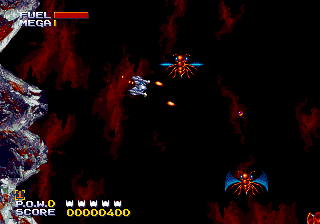
SubTerrania drops you into a deep-space mining colony overrun by aliens. Your ship is a small craft that uses a unique rotate-and-thrust control scheme: you press left or right to rotate your ship on the spot, then the designated thrust button to accelerate in the direction your nose points. Gravity pulls you downward constantly, and inertia keeps you drifting when you let off the throttle. This makes navigating the caves and tunnels a constant balancing act between speed and control.
The core loop is simple but demanding: fly through procedurally laid-out caverns, dodge hazards, and shoot alien enemies that swarm from all directions. You need to rescue trapped miners by flying over their locations, which usually triggers a short cutscene. Fuel and health pickups are scattered around, but resources are scarce, so every shot counts. The game uses a lives system with no continues, so a single mistake can end your run.
Start by selecting a difficulty from the title screen (Easy is recommended for first-timers). The first level introduces the basic controls and low gravity, letting you get a feel for the ship's handling before the difficulty ramps up. Keep your speed moderate and always watch for incoming projectiles - the screen is relatively small and enemies can appear from any direction. There is no radar or map, so memorizing room layouts helps a lot on later attempts.
CONTROLS
Controls
- Arrow Keys: D-Pad / Movement
- X: A button
- S: B button
- Z: C button
- A: X button (6-button pad)
- Q: Y button (6-button pad)
- E: Z button (6-button pad)
- Enter: Start / Mode
SubTerrania FAQ
Who developed SubTerrania?
SubTerrania was developed by Zyrinx, a Danish game studio that produced only a handful of titles for the Sega Mega Drive/Genesis. The team later worked on other retro shooters and arcade-style games.
Can players save progress in SubTerrania?
SubTerrania does not include any save or password feature. The game must be completed in a single session using the limited lives and continues available on the selected difficulty.
Is SubTerrania exclusive to SEGA Genesis or did it appear on other systems?
SubTerrania was released exclusively for the Sega Mega Drive/Genesis in 1994. No ports or re-releases for other platforms were ever produced, though it is now available on many retro gaming emulation sites.
You may also like
All SEGA Genesis games











GAME INFO
- Platform
- SEGA Genesis
- Genre
- Shooter
- Released
- 1994
- Players
- 1
- Region
- USA
COMMENTS (0)
No comments yet. Be the first to share your thoughts.